

In short: On 8 October 2026, Microsoft added three Dynamics 365 Customer Insights skills to Copilot Cowork. Use cases include enabling marketers to check who they’re allowed to email in a segment, ask why a journey stopped, check a segment’s size and criteria, and review emails without opening Customer Insights.
“Why didn’t this person get our email?”
It’s a common question we hear after a Dynamics 365 Customer Insights rollout. The cause is almost always consent, but confirming it means opening Customer Insights, finding the contact, checking the consent centre and figuring out which rule applied. That’s minutes away from what you were writing in Word, or Teams, where someone just pinged you.
This update means you can get marketing answers like this by asking Copilot, without opening Customer Insights.
What Microsoft announced on 8 October
Microsoft added 30 ready-made CRM skills to Copilot Cowork, the mode in Microsoft 365 Copilot that carries out tasks on your behalf.
Most of the skills focus on sales and service teams, but three are for marketing teams using Dynamics 365 Customer Insights. Microsoft’s Copilot blog describes them as:
Tailor outreach, draft and review on-brand emails, and launch customer journeys with consent and readiness checks built in.
For marketing teams, that line confirms where Dynamics 365 is heading.
Microsoft describes CRM as where your data lives, with Copilot bringing answers and actions to the people doing the work. Your CRM acts for you via Copilot, which you can open alongside other applications, without always needing to be in Customer Insights.
Checking consent in Copilot
We think marketing teams will get the most value from prompts like this one, taken from Microsoft’s documentation:
“Check whether I can email our Enterprise Renewals segment about the Q3 product update, then show me who is blocked and why.”
In Copilot, that returns a summary of how many people will receive the email and a list of who won’t, with a reason for each. Microsoft Learn says the check applies the same rules Customer Insights uses when it sends. So, the answer in chat matches what Customer Insights will do when your journey reaches that email.
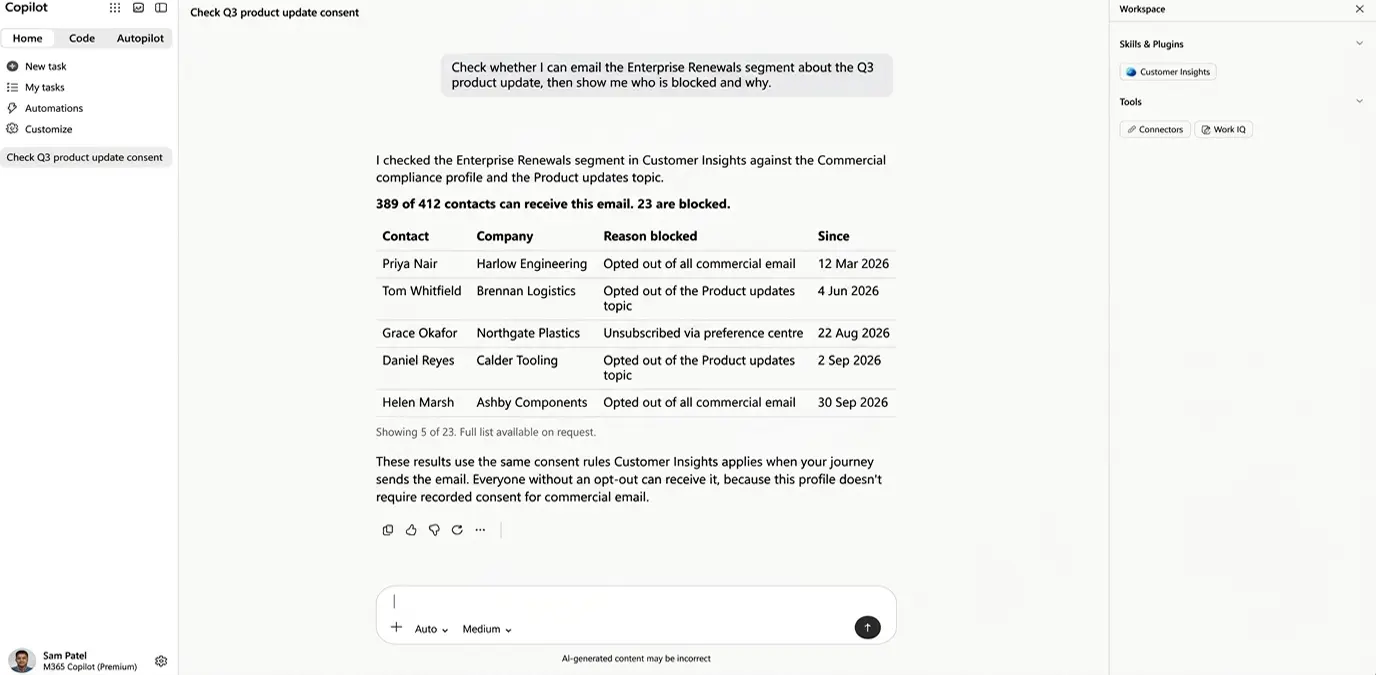
A sales manager asking a similar question, “Can we include these contacts?”, gets a quick answer with reasons attached, and nobody has to export a list to check.
However, Copilot can only report what your consent setup says. If your Customer Insights compliance profiles, rules or topics are still set to the default, Copilot won’t provide the right answer.
Other questions you can ask
We think consent questions are a clear win, but the same idea runs through other everyday questions about customer outreach.
Ask “Show me my active journeys and tell me why the onboarding journey stopped“, and you get an explanation without opening the journey designer.
If you capture sign-ups through a Customer Insights form, on your website or a customer portal, you could ask for a welcome journey that starts when someone submits it. Copilot asks you to confirm before it creates or changes anything.
Another skill reads what Customer Insights holds on your customers: which segments they belong to, calculated measures and predictions such as likelihood to churn. To plan a campaign, ask “How many members are in the VIP segment, and what is the criteria behind it?” and check your audience before you build anything around it.
Where email advice fits
The third skill reviews and drafts email copy against your brand rules.
Before opening the usual email editor in Customer Insights, you can hand Copilot a brief, get back a first draft that follows your brand rules, and ask Copilot to add it to Customer Insights as a new email.
Microsoft hasn’t said how much of the design it covers, so you may need to add finishing touches in the editor. Once the email is ready, a marketing user could ask whether it will publish and get the brand and compliance checks without needing to be in a Customer Insights screen.
What to get right first
While Microsoft has put most of its effort into sales and service agents so far, we expect marketing to get more as these skills mature.
The direction is already clear. Copilot will answer questions about your customers and initiate actions without anyone opening Customer Insights.
Some argue that makes CRM less relevant because fewer people need to open it, but we see it the other way. When answers arrive through Copilot, CRM still does the work, out of sight, so the structure and accuracy of the data behind each answer matter more than ever.
For Customer Insights, consent is one of the best places to start. We’ve released a 14-minute video on setting up consent, covering how it is stored and how to choose the right rules for your business.
Watch it now, then talk to us if your Customer Insights setup needs a second look so you can benefit from these Copilot capabilities.
Microsoft Learn Article: Use Customer Insights skills in Copilot