Segments in Dynamics 365 Customer Insights determine who receives your marketing messages. The segment builder connects Dataverse data, behavioural signals, and unified customer profiles, giving marketing teams direct control over audience targeting without needing technical support.
Unlike marketing platforms that rely on reliable data synchronisation from a separate CRM, Customer Insights works directly within Dataverse. This means there’s a single source of truth for both your customer data and your campaign activity.
Whether you’re defining who enters a journey, who gets excluded, or who exits based on their actions, segments are the mechanism that makes it all work.
Let’s explore the key segmentation capabilities across both the Journeys and Data modules.
Watch the full Customer Insights Segment video walkthrough
Working with Segments in Customer Insights – Journeys
When you create a segment in the Journeys module, you select a target audience of contacts or leads. Then, you build rules using attributes from those tables. This is more powerful than the older marketing list functionality in Dynamics 365. You can reference related entities and pull in attributes from other parts of your data model without duplicating data.
A lead segment can apply filter rules across related contact and account tables or draw on fields from a custom table, as long as a relationship exists in Dataverse.
This is a meaningful advantage over platforms where marketing and CRM are disconnected — attributes that don’t sync across don’t exist for targeting purposes, which silently limits what your audiences can be based on.
One practical note: calculated and formula fields aren’t supported in the segment builder because they are generated dynamically and can’t be detected for changes.
Configuring rules accurately
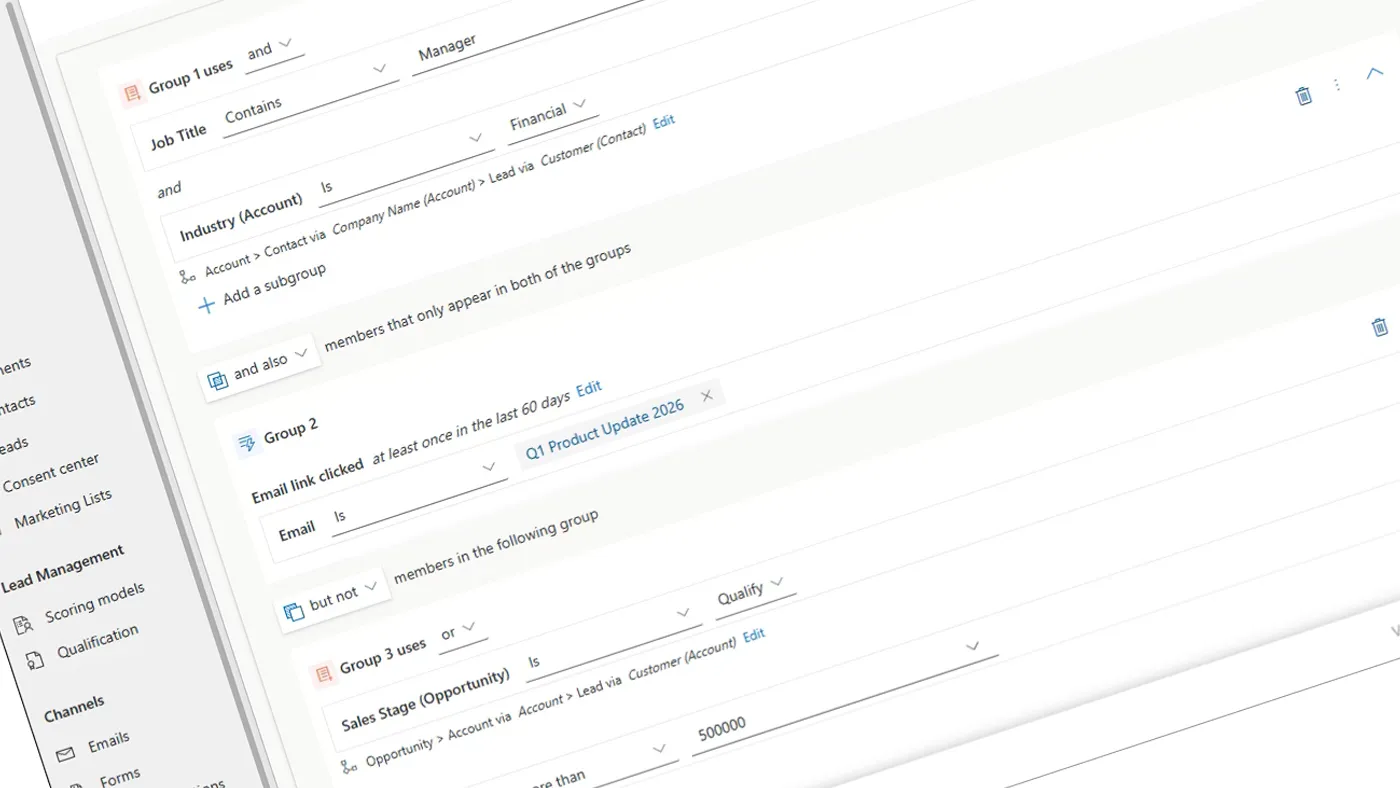
Choose your condition operator carefully. For free-text fields like job title, avoid “Is” unless entries match exactly. Use “Contains” to capture more relevant records. If your segment shows fewer or more members than expected, consider checking your operator first.
Verify the relationship path when referencing related fields, as an incorrect path may pull incorrect records without error. It’s worth double-checking before publishing.
Group operators and audience logic
Multiple attribute groups can be connected using three operators:
AND ALSO requires a record to meet the criteria of both connected groups. This is useful for combining a demographic condition with a behavioural one, such as premium members who have clicked a specific email.
OR broadens the audience by adding members who meet either group’s criteria.
BUT NOT excludes records matching the connected group.
This lets you combine demographic criteria, behavioural intent, and exclude certain audiences. Other platforms need multiple lists, complex queries, or outside involvement for this.
Segment refresh modes
When publishing, you choose between automatic refresh, where the segment periodically re-evaluates as records update, and a static snapshot, which locks membership at the point of publishing.
Static is useful for scenarios like an end-of-quarter promotion, where you want to reward customers based on their tier at a specific moment, not as it shifts over the course of the campaign.
One thing to be aware of: from February 2026, Microsoft automatically expires segments that haven’t been used in an active journey for 30 days. The segment moves to a 24-hour refresh cycle once it leaves active use, then transitions to an Expired state if still unused. No data is lost, but the record becomes read-only. To reactivate it, open the segment and use the Activate option — but select a Status Reason of Draft first, not “Ready to use”. Once activated, you can then set it to Ready to use. Attempting to skip straight to Ready to use triggers an error.
CSV spreadsheet segment lists
If you manage certain audience lists in spreadsheets, you can upload a CSV file directly into Customer Insights to create a segment of up to two million records. Records are matched against existing contacts or leads by email address. What previously required a lengthy manual import process can now be completed in a few seconds.
Using Segments within Journeys
Once published, a segment can serve the entry audience for a journey, with up to 15 segments selectable per journey. Beyond entry, segments serve three further roles:
Exclusion at entry prevents specific audiences from entering a journey even if they meet the entry criteria. This is useful where messaging isn’t appropriate for a particular group.
Exit conditions remove contacts from an active journey when they meet a segment’s criteria. If someone redeems an offer, a dedicated segment that checks for that action in real time can remove them immediately, preventing follow-up emails to someone who has already converted.
Wait conditions pause a contact’s progression until they become a member of a specified segment, then move them to the next step.
We recommend scheduling regular reviews of active segments, especially those for exit or exclusion.
Outdated or deactivated segments can unintentionally affect communication.
Bear in mind that segments unused for 30 days now expire automatically — so a review cadence also helps you catch and reactivate any that have lapsed before they affect a live campaign.
Segmentation in Customer Insights – Data
For organisations using both modules, Customer Insights – Data extends segmentation to unified customer profiles built from multiple sources, such as CRM systems, websites, transactions, and third-party platforms.
Journeys segments query Dataverse. Data segments operate on unified profiles, using available attributes from the connected external sources. For organisations where customer data lives across multiple systems, this removes the need to consolidate data manually before it can be used for targeting.
The Data module also supports customer measures. These are calculated values such as total spend, average order value, or visit frequency. These can be used directly as segment criteria, moving audience definition beyond demographics into behaviour-driven targeting.
AI-powered features (in preview as of March 2026) include segment overlap visualisation and suggested segments based on your measures and customer activity. The Find Similar Customers feature uses machine learning to expand an existing audience without manually defining additional criteria. Click here if you want to learn more about these capabilities.
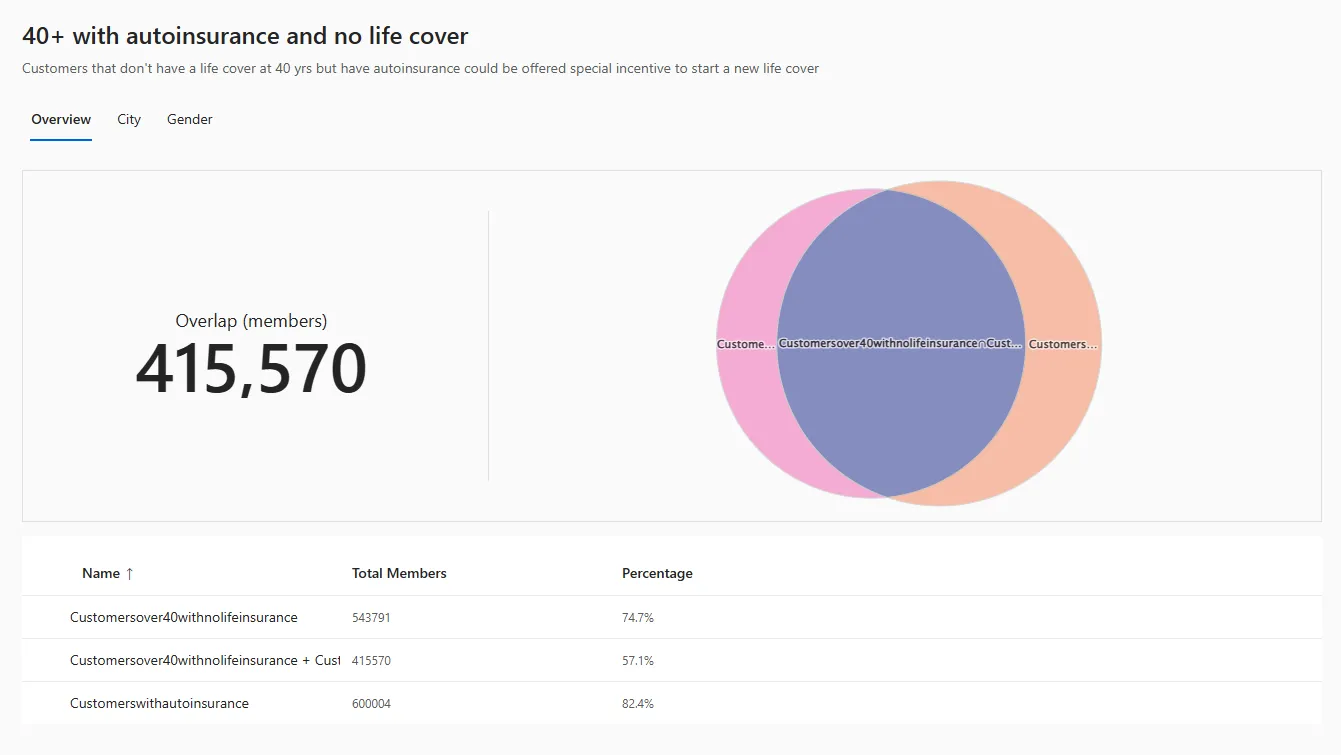
When both applications are installed in the same environment, Data segments appear in the Journeys audience picker. You can build segments in Journeys that reference unified profile attributes and calculated measures from Data without leaving the Journeys builder.
This means the depth of your unified profile data is accessible at the point of building your campaign audience, without switching between applications or exporting data. Each unified profile still needs a matching and valid contact or lead record in Dataverse to be included.
Getting the most from Customer Insights segments
Journeys segments give precise control over who receives your messages using CRM data and interaction history. The Data module extends this with unified profiles that draw on data from across the business. The result is a segmentation capability that grows with your data. The more sources you connect and the more your Dataverse matures, the more precisely you can define and reach the right audience.
If you’re considering Customer Insights or looking to get more from an existing deployment, ServerSys can help you configure segments, journeys, and the wider platform to fit your operations.