
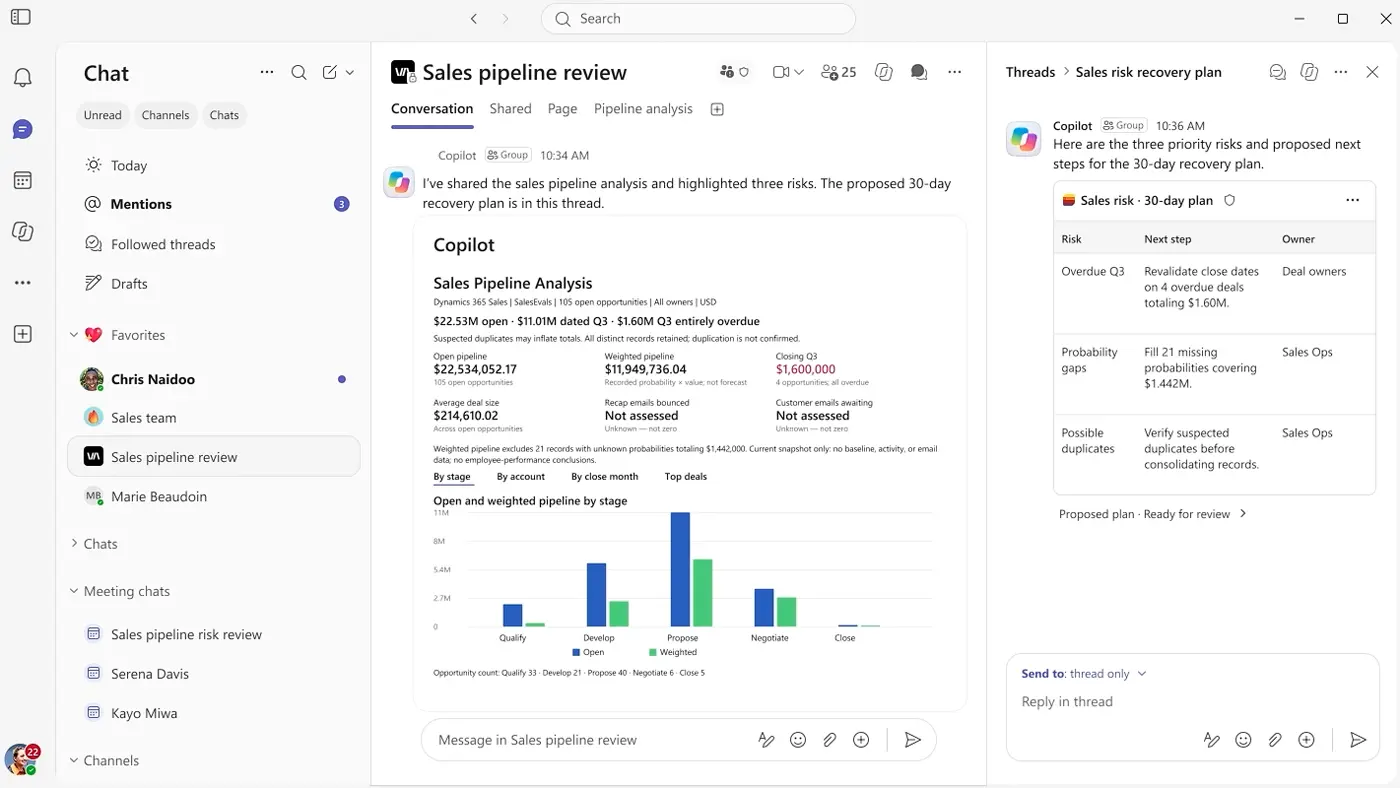
Until now, Copilot was mostly in Outlook and Dynamics 365, which typically meant working on one record or table at a time.
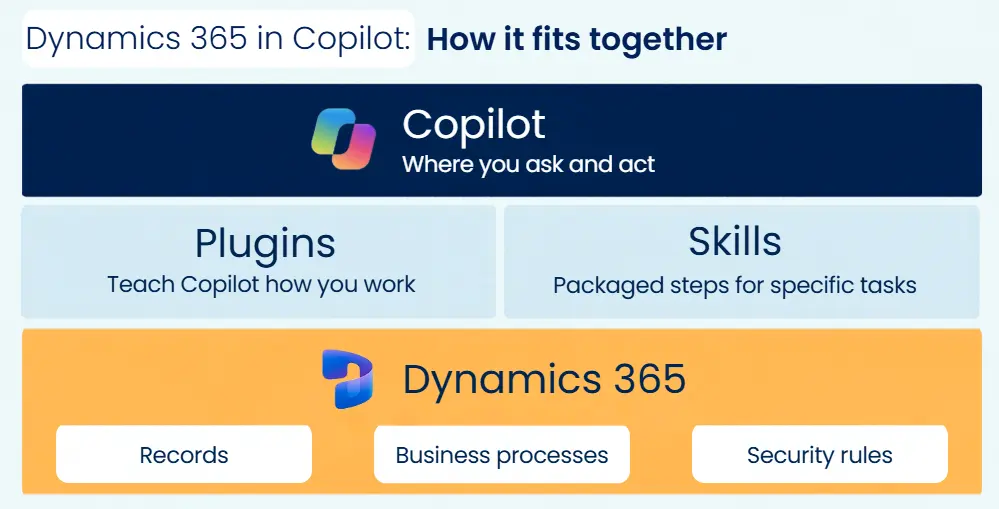
Now, Copilot can be the front door to Dynamics 365 and your processes. Plugins for the Sales, Customer Service and Customer Insights applications give it the skills to act across your environment.
If you’ve tried Copilot for record summaries and email drafts but rely on ChatGPT or Claude for the harder work, it’s time to take another look.
The reason starts with what’s underneath.
Copilot now draws on leading models, including those from OpenAI and Anthropic, and pairs them with your business data and the power to act on it.
Watch the demo
See the story behind your records
If you spend a good part of your day in Dynamics 365, switching between forms and views, you’ll know it isn’t always easy to see what it all adds up to.
By contrast, Copilot reads across your records, files, and inbox, explains what it finds with evidence and suggested next steps. Nobody has to create another view or Power BI dashboard to get there.
It also changes how you work with your data. You can brainstorm ideas, plan ahead, research a client or test an idea, then ask follow-up questions until the picture is clear.
Act on the answer
What’s changed is that you don’t always have to switch to the Dynamics interface to act on what you find. From a Copilot chat, you can create a record, update a field, add a note or change a date. It asks you to confirm before it does anything.
Bigger jobs work the same way. For instance, we asked Copilot to create a campaign in Customer Insights – Journeys, including the segment, emails and journey. The resulting quality impressed us, including email drafts with the correct branding and compliance settings, drawing on what it knew from our data.
Why this Copilot is different
The AI behind Copilot has changed. It now automatically chooses the right model for each task, or you can pick one if your organisation allows.
What hasn’t changed is the security. Copilot works on your data within Microsoft 365, sees only what each person is already allowed to see, and doesn’t use your data to train the AI.
OpenAI’s models run in Microsoft’s cloud, and Claude models are also covered by Microsoft’s data protection terms, with Anthropic acting as a Microsoft subprocessor. Currently, UK organisations have Claude switched off by default until an admin enables it.
Compare that with the effort and risks of copying CRM data and pasting it into a standalone AI tool, where your security rules no longer protect it.
More people can use what’s in Dynamics
With Copilot, anyone with access can use what’s in Dynamics, even if they’re not a power user. You can ask in plain words, typed or spoken, challenge a response and ask clarifying questions.
For a business that’s already invested in Dynamics 365 and the Microsoft stack, that should mean more of the organisation gets value from it.
Regular requests can run on a schedule. Copilot provides answers on the timeframe you set without anyone having to ask again.
Getting started safely
To use this, you’ll need a Microsoft 365 Copilot licence, plus a licence for each Dynamics 365 app you want Copilot to reach. An admin then switches on Copilot Cowork, the Dynamics 365 plugins and the Dataverse MCP server for your environment.
For email engagement insights from Customer Insights – Journeys, you’ll also need Microsoft Fabric.
Copilot credits come from a pool shared across your organisation, with limits set by administrators for teams and users. Scheduled tasks and test environments use them too, so it pays to match how often a task runs to how often someone acts on it.
Guardrails can be set so that everything Copilot builds starts as a draft and automated messages go to an internal test group first. Further controls ensure that people approve anything that goes out.
Where this is heading
We see Copilot becoming the place where more work starts, reducing reliance on familiar application screens. That could go beyond Dynamics 365 if users can access more of their data and processes by asking and instructing Copilot, but only if the data is trusted.
Working through individual records in Dynamics, people tend to notice when something looks wrong, such as a missing value or a duplicate. But Copilot reads across thousands of records at once and returns a polished summary, so those warning signs are less visible. And as more people act on those answers, these gaps can have a bigger impact.
Copilot can’t fix what it reads, so for it to make a positive difference, accurate data has never mattered more.
Get in touch to talk it through. We can help you decide where to start, put the right governance and guardrails in place, and bring your team with you.