Power Pages deploys websites connected to Dynamics 365 and Power Apps, giving customers, members and other stakeholders self-service access to business data and processes.
When you provide that access, the security of what sits behind your website depends on how the product is architected and configured.
Microsoft has built multiple layers of protection into Power Pages at the platform level. If organisations encounter security issues, the causes are consistently in how access controls and permissions are set up, rather than any product weakness.
These are configuration decisions that benefit from specialist experience, and why working collaboratively with an implementation partner makes a real difference to the outcome.
This article covers what Microsoft builds into Power Pages, where configuration determines your security posture, and why ongoing attention is essential.
How Microsoft Protects Data by Design
Power Pages runs on Microsoft Azure, which means your portal benefits from the same infrastructure security that protects the most sensitive data. Physical data centre security, automatic operating system patching, and distributed denial-of-service (DDoS) protection are handled at the platform level.
All data moving between users’ browsers and the Power Pages servers is encrypted using a standard that meets industry and government requirements (TLS 1.2 or later), with secure connections enforced across every site.
Data stored in Microsoft Dataverse is encrypted at rest using methods that meet internationally recognised information processing standards. In practical terms, this data is subject to the same grade of encryption as Azure and Microsoft 365 environments.
Each site can be protected by a Web Application Firewall (WAF) that filters malicious traffic and guards against common web application threats, including SQL injection and cross-site scripting.
For business continuity, each Power Pages website is deployed across two Azure regions (e.g. UK West and UK South), with automatic failover if the primary server becomes unavailable.
The design follows Zero Trust principles throughout. Every access request is verified, default access is kept to the minimum necessary, and the system assumes that any activity could be an attempted breach.
Microsoft also applies its Security Development Lifecycle to Power Pages, with regular penetration testing and threat modelling.
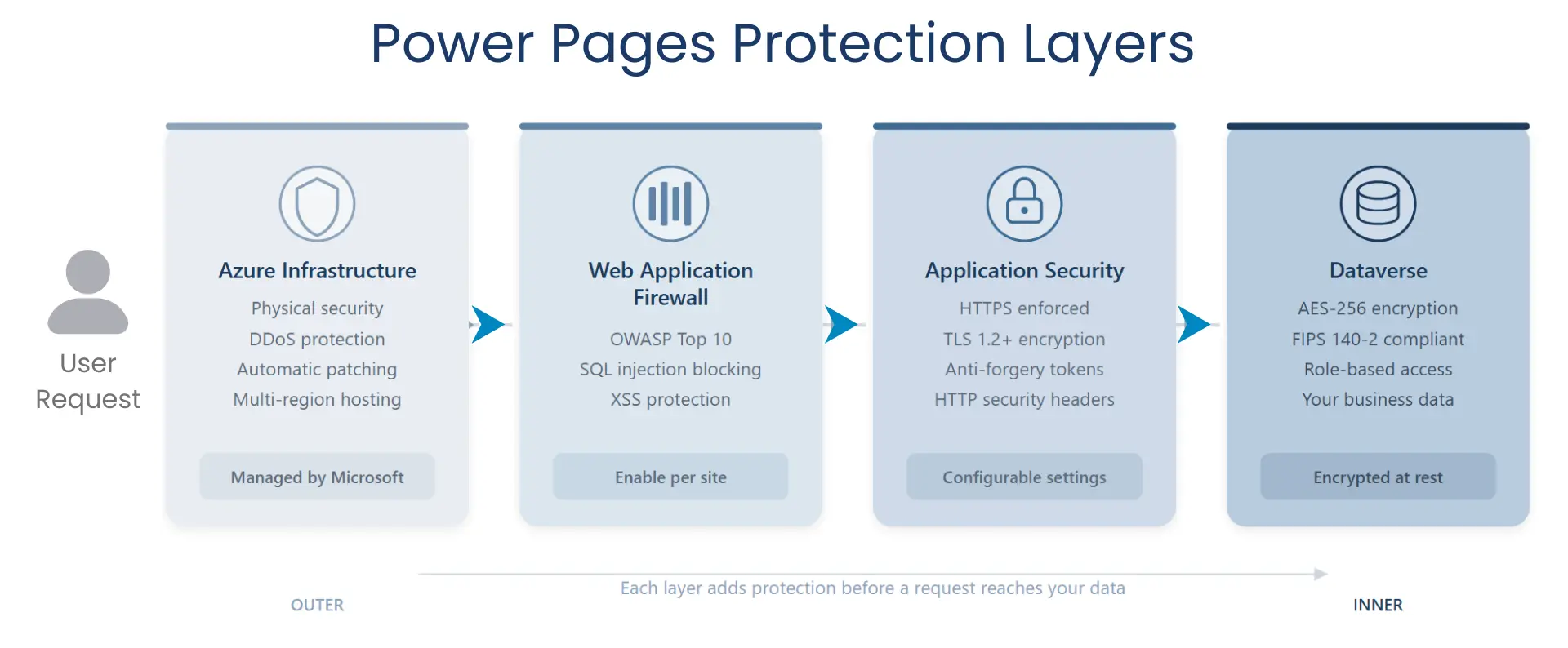
If you want the full technical details, Microsoft’s Power Pages architecture, security and authentication whitepapers document these protections comprehensively.
The key takeaway is that the foundation is strong. What matters next is how your portal is configured on top of this.
Configuring Your Power Pages Site
The configuration layer is where your portal’s real-world security takes shape. The decisions made here determine who can access your data, what they can see, and how well protected your site is against common threats.
These are areas where ServerSys or your implementation partner will guide you, working through each in the context of your requirements and security policies.
Authentication and identity
Microsoft Entra External ID is the recommended identity provider for external users, replacing Azure AD B2C. Multi-factor authentication should be standard, just as it is for Microsoft 365 and Dynamics 365 users.
Session management needs to align with your organisation’s security policies. The default session idle timeout is 24 hours, which may be more permissive than your security policies require.
You also need to decide how users register for your portal. These options are open self-registration, invitation-only access, or pre-created contacts. Each model carries different security implications, and this should be agreed upon before launch.
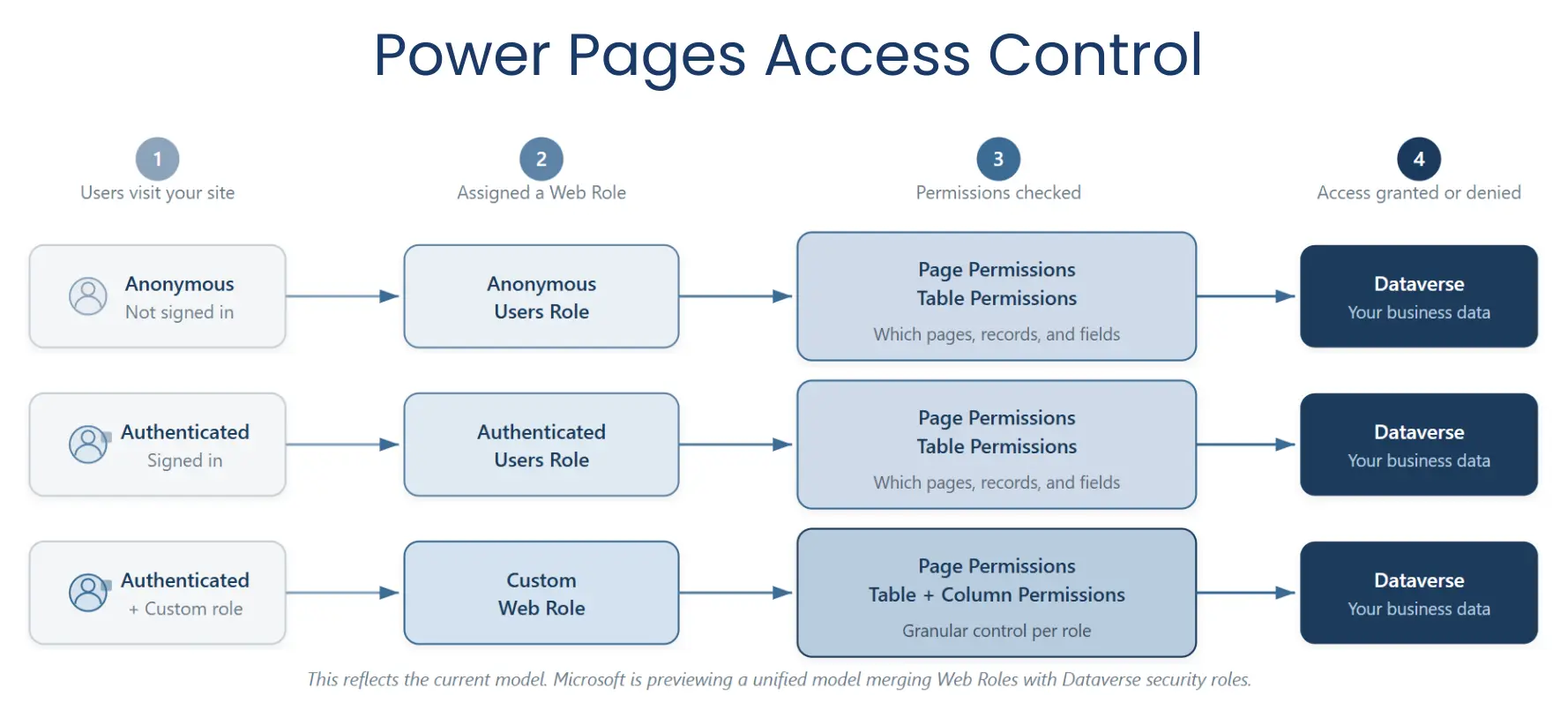
Once authenticated, each user is linked to a contact record in Dataverse, which connects their identity to the web roles and permissions that control their access.
Role-based access control
These controls follow the same principle of least privilege that governs Dynamics 365 security.
Access to your data is managed through layered permissions covering which website pages each role can see, which records they can interact with, and which fields are visible. These defaults are deliberately restrictive, but a risk to watch for is granting authenticated external users the same level of access as internal staff.
Microsoft is previewing a unified authorisation model that merges portal and Dataverse security roles, which should simplify this management once it reaches general availability.
Anonymous user access
Anonymous access requires especially careful planning because granting broad permissions to the anonymous user role risks exposing data, as covered in our earlier article. Power Pages warns when global access is granted to anonymous users, but these warnings are only helpful if someone reviews the configuration carefully.
HTTP security headers
Headers such as Content Security Policy and Cross-Origin Resource Sharing controls are available but turned off by default, because each site has different requirements. Once those are clear, enabling these headers restricts interactions to trusted sources and guards against common web attacks. Your partner should configure these as part of the build.
Site visibility
Visibility is the final safeguard. New Power Pages sites are private by default, preventing unfinished portals from being publicly accessible. Before changing visibility to public, all permissions, web forms, and published data should be validated for all user roles.
Managing Power Pages security after launch
As your portal evolves, your security posture should evolve with it.
Power Platform admin centre provides a centralised security dashboard to monitor Power Pages sites across your tenant to highlight key issues. These can include sites allowing anonymous access to Dataverse tables, where the Web Application Firewall is disabled, which authentication providers are in use, and whether SSL certificates or authentication keys are approaching expiry.
The dashboard also runs automated security scans and scores each site as Standard, Enhanced, or Advanced based on how its configuration aligns with Microsoft’s recommendations. If you are running multiple websites, this provides a single view of your security posture, without needing to check each site individually.
Power Pages also supports audit logging that tracks failed login attempts and data access, downloadable from the Microsoft 365 Compliance Centre. These logs matter for compliance and identifying unusual activity.
For deeper monitoring, Application Insights integration provides diagnostics and behavioural data that can highlight anomalies worth investigating.
Microsoft’s Site Checker tool flags common misconfigurations and is worth running periodically. It provides a point-in-time diagnostic rather than continuous monitoring, so it works best as part of a regular review cycle.
Microsoft is also previewing a security agent built into the Power Pages design studio using AI to run automated vulnerability scans, monitor site traffic, and guide remediation through a conversational interface.
The most important ongoing discipline is reviewing the permissions model as your site changes. New web forms may connect to Dataverse tables that carry different sensitivity levels. Additional user groups might need different levels of visibility. The same rigour applied to reviewing Dynamics 365 security roles should extend to Power Pages web roles and table permissions.
Getting this right from the start
The organisations that get the most value from Power Pages treat security as part of the design from day one.
Getting authentication, access controls, and monitoring configured correctly at the outset avoids difficult remediation work that follows when gaps subsequently appear.
Security configuration for Power Pages is detailed work with real consequences for your data. ServerSys works alongside you at every stage, from initial design through to ongoing reviews, so these decisions are made with the technical security model and your business context in clear view.
If you are planning a new Power Pages project or reassessing an existing portal, let’s talk about what the best configuration looks like right now.