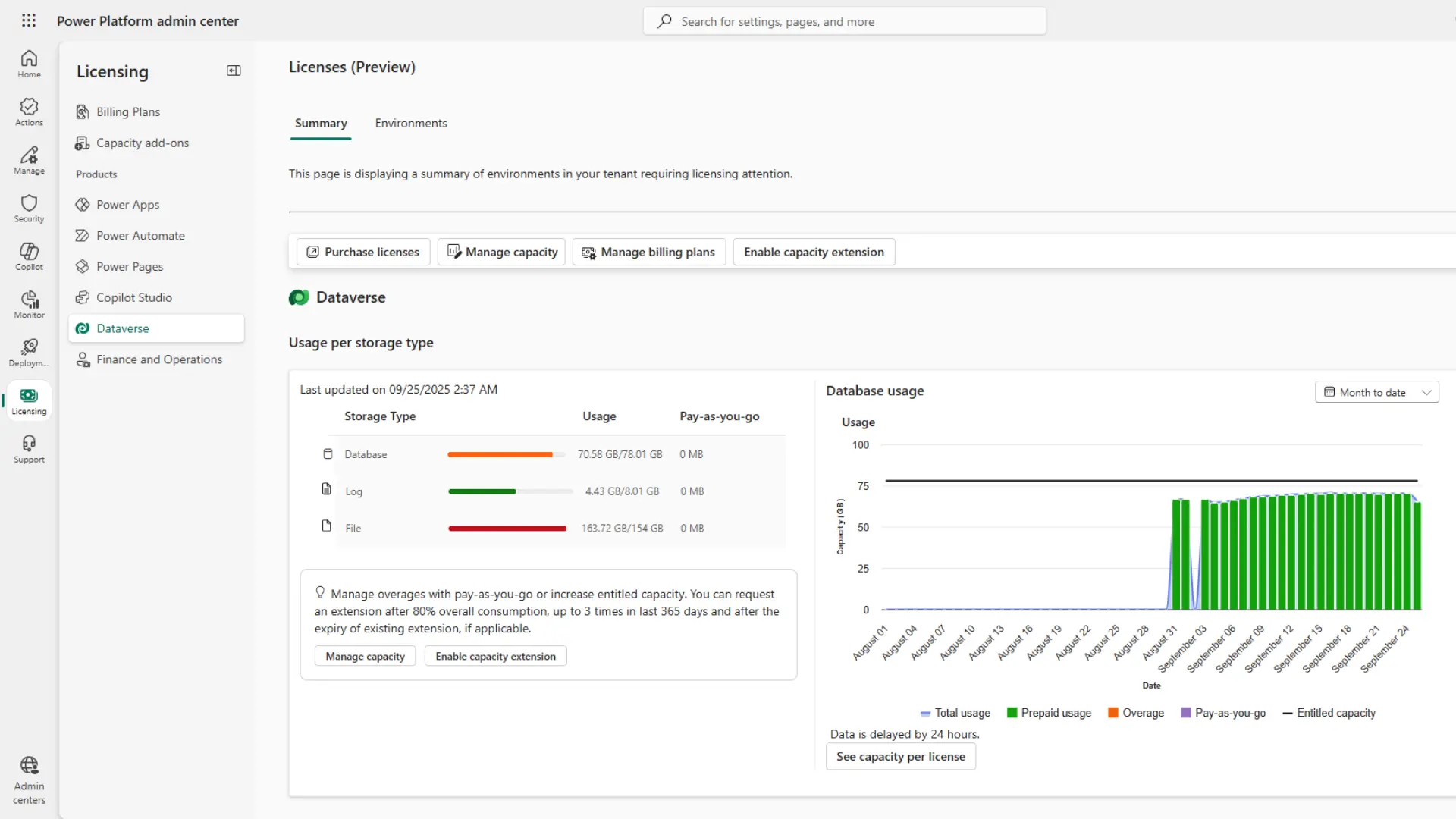
You can reduce Dataverse consumption without purchasing add-on capacity or deleting data you need to keep.
Practical options include bulk deletion of obsolete records, reviewing audit log and Copilot transcript retention periods, removing deactivated Power Automate flows, and redirecting files to SharePoint or Azure Blob Storage.
For inactive records with compliance requirements, Dataverse retention policies compress data by up to 50% while preserving read-only access. This article covers each tactic, starting with the quickest wins and progressing to longer-term alternatives.
Data Cleanup
Before considering broader solutions, cleaning existing data often creates immediate capacity savings. Every Dynamics 365 environment accumulates unnecessary data over time, and proactive management frees valuable space.
Bulk Deletion Strategies
Bulk deletion is the most direct method to maximise capacity. You can apply filters to identify and remove obsolete records like test data, suspended system jobs, or old completed activities that don’t need to be retained.
Automate this process by setting up Power Automate flows that run on scheduled intervals, applying consistent criteria to prune your database.
Audit Log Management
Audit logs track data changes but rarely need indefinite retention.
Following large imports or bulk operations, audit logs can swell significantly. Review your audit settings in the Power Platform Admin Center to confirm appropriate retention periods that meet your compliance needs without consuming excessive capacity.
Copilot Transcript Management
As AI adoption increases, Copilot transcripts have become another source of capacity consumption.
These transcripts record user interactions with Copilot and count against your Dataverse file capacity.
The size depends on usage and how many Dynamics 365 fields are configured to be accessible to Copilot summaries and chats. While default retention for these transcripts is 30 days, this can be reduced to minimise file capacity impact. For longer retention, we’ve shared more cost-effective solutions below.
Flow Deletion
Deactivated Power Automate flows in Dataverse continue to consume space. Depending on their complexity and the volume, deleting these legacy flows can quickly free up tangible capacity.
For instance, when using Dynamics 365 Customer Insights – Journey, a flow is automatically created for each journey, which can quickly amount to a significant number of flows. When each journey is completed, the corresponding flow will be deactivated but continues to consume capacity.
Legacy Table and Field Cleanup
Organisations that have been using Dynamics 365 for several years often have redundant fields or even entire data tables.
Legacy fields from previous systems or unused configurations may seem insignificant individually, but if these are populated across thousands of records, they can contribute to unnecessary consumption.
Identifying and safely removing outdated tables or fields will clean up your environment and reduce its size.
Alternative Storage Solutions
While data cleanup is crucial, you don’t always need to delete data to optimise Dataverse capacities.
Moving data to alternative locations often reduces costs compared to premium Dataverse capacity.
Dataverse Retention Policies
For inactive records needed for compliance or historical purposes, Dataverse retention policies can be attractive by moving data into secure, long-term retention within Dataverse.
This process involves compression, which can reduce your consumption by up to 50% while maintaining read-only access through advanced find queries and Power Automate flows.
However, a critical limitation exists as Dataverse long-term retention doesn’t compress file attachments.
For detailed information, see our article on cutting Dynamics 365 costs with Dataverse Retention Policies.
SharePoint Integration
By default, files uploaded in Dynamics 365 are stored in Dataverse, but a more cost-effective approach can be to use SharePoint integration.
We’ve helped clients create Power Automate flows that automatically direct file uploads to SharePoint libraries. This decreases Dataverse file capacity usage while utilising SharePoint’s document management features and maintaining accessibility within the Dynamics interface.
You can read more about SharePoint integration with Dynamics in our article.
Azure Blob Storage
For large archived data volumes, particularly file attachments that can’t be compressed in Dataverse, Azure Blob Storage provides a cost-effective alternative.
ServerSys has helped numerous clients implement automated flows that push legacy data into Blob Storage aligned with their retention policies. This ensures data remains secure and accessible within the Dynamics 365 interface without incurring premium Dataverse add-on costs.
Learn more about using Blob Storage to archive data.
Minimising Data Capacity Use with Planning
Beyond reducing Dataverse consumption and finding alternatives, here are some approaches to avoid unnecessary consumption through careful planning and best practices.
Data Import Best Practices
Poorly managed migrations create consumption challenges and erode user trust if inconsistent data undermines confidence in the technology.
Tough decisions are required to ensure only essential data is brought into Dynamics 365. Sufficient time spent on data cleansing before import will prevent future problems and minimise capacity demands.
When there is a need to retain older data for legal and compliance purposes, it can be archived using more cost-effective solutions. Ultimately, Dataverse isn’t designed or priced to be a data warehouse.
Virtual Entities
Dynamics 365 virtual entities access external system data without storing it in Dataverse. This is particularly useful for transactional data from ERP systems and other applications.
Virtual entities enable you to view and interact with data directly within Dynamics without duplication or additional consumption.
Enterprise Solutions
For organisations with complex data management needs, Microsoft Fabric offers unified platforms combining data integration, warehousing, and business intelligence. Fabric optimises storage costs through automated data tiering and unified data lakes that eliminate system duplication.
However, significant monthly costs make it best suited for enterprise organisations. Small and mid-sized firms will likely benefit more from the other optimisation strategies outlined here.
March 2026 Update
Microsoft increased two default Dataverse capacities for Dynamics 365 Sales Premium in March 2026. For Sales Enterprise customers, upgrading a single licence to Premium now costs less than buying the equivalent Dataverse add-on capacity. Read our article to learn more
Taking Action on Dataverse Storage
Effective optimisation combines multiple tactics rather than relying on a single approach. These strategies help minimise costs while maintaining performance.
Watch our presentation to explore how you can maximise capacity and reduce Dataverse costs.
We help organisations free up Dataverse capacity and reduce costs through our consultancy services. Find out how much capacity you could free up – and any add-on costs you could avoid – with our calculator.
Updated: April 29, 2026