Server logic functionality for Power Pages is now generally available.
Power Pages has always offered a straightforward way to build external-facing portals on top of Dataverse. But if your portal had to do anything secure on the server – call an external API, handle a client secret, or run logic away from prying eyes – we needed to build additional infrastructure to make it happen.
That changes with server-side logic. It now lets us write JavaScript that runs on the server rather than in the user’s browser, directly within your Power Pages site. As Microsoft puts it, this turns Power Pages into a “backend-enabled experience” – and for many portal projects, that should mean less complexity, faster delivery, and lower cost.
What is Power Pages Server Logic?
When you add JavaScript to a Power Pages site today, that code runs in the visitor’s browser.
Anyone with basic developer tools can see it, modify it, or interfere with it. That might be okay for user interface behaviour, but it creates problems when you need to protect sensitive logic or credentials.
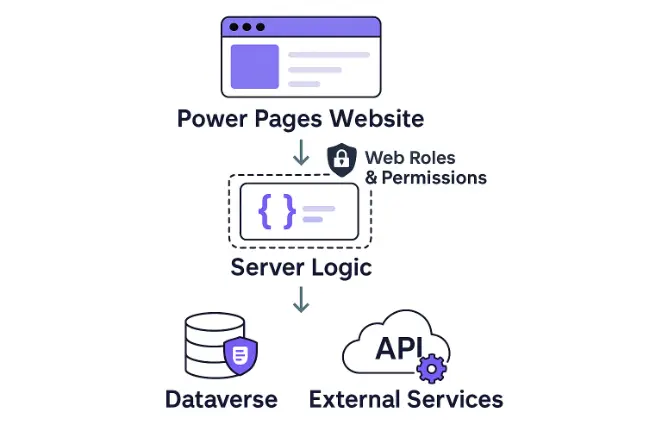
Server-side logic flips this around. Your code runs on Microsoft’s servers before the response reaches the browser. The visitor never sees it, so you can safely include API keys, authentication tokens, and business rules without risks of data exposure.
You author server logic in Visual Studio Code, which provides suggestions as you type and flags errors before you deploy.
The code is stored in Dataverse alongside other Power Pages components. This means it follows the same deployment pipelines and benefits from the existing lifecycle management principles of one solution, one deployment.
Why Power Pages Server Logic Matters
Modern portals do more than display static content. Customers expect transactions, workflows, and connected data flows.
Previously, if you needed your portal to integrate with an external service, such as a payment gateway, you typically needed what’s called a companion app. These separate applications, often Azure Functions, sit alongside a portal to handle the secure work.
Companion apps work, but they add complexity. You have a separate codebase to maintain, a separate deployment process to manage, and a separate set of credentials to secure.
Server logic removes the need for this intermediary configuration in many scenarios.
Secure code lives inside a Power Pages application, deploys with your website, and runs within the Power Pages infrastructure. The result is fewer moving parts, with faster development and simpler maintenance.
Reducing Reliance on External Infrastructure
Server logic in Power Pages supports integrations that previously required external infrastructure. The various building blocks include:
- Server scripts where you write logic to call APIs, transform data, or run workflows.
- Server objects that give you safe access to HTTP calls and Dataverse operations.
- Event triggers that invoke logic based on form submissions, button clicks, or programmatic calls from the client side.
- Governance controls that let admins disable external calls from server logic, enforcing outbound connectivity policies.
Potential example scenarios for using server-side logic include:
- Verifying user identity against a verification API before processing a form.
- Fetching loyalty points or account balances from an external rewards platform.
- Sending loan application data to an internal engine.
- Connecting to Microsoft Graph or SharePoint to manage documents without exposing credentials.
The common thread is secure integration.
Anywhere you need to exchange data with an external system and protect the credentials or logic involved, server-side logic provides a cleaner path than building separate infrastructure.
Choosing the Right Approach
Server-side logic delivers the most value when a Power Pages website needs secure external integration, but the requirements don’t justify a full companion app.
Think single-purpose integrations: validating an address, checking a credit score, posting to a webhook, or retrieving data from a third-party API.
These operations have typically required Azure skills, additional hosting, and a separate deployment pipeline. With the arrival of server logic, they can stay entirely within Power Pages.
For standard data operations – creating, reading, or updating Dataverse records where no secrets are involved – the existing Web API remains appropriate. But for anything that requires protected credentials or needs server-side validation, this new capability significantly simplifies the architecture.
Existing companion apps that are running well don’t need to be rewritten. But for new projects, server-side logic reduces the technical footprint and keeps more of these solutions in one place.
Release Timeline
The server-side logic preview was announced in October 2025. On April 1, Microsoft confirmed this feature is now generally available, which includes a couple of additional capabilities beyond the preview release:
- Support for unbound Dataverse custom APIs to call reusable business logic defined in Dataverse, rather than duplicating it within portal code.
- Governance control to disable external calls to protect from data exfiltration and enforce network-boundary policies at tenant level.
If you’re exploring Power Pages and want to understand how server-side logic might simplify your portal project, please get in touch.
ServerSys specialises in tailored portals built on Microsoft technology, integrating with Dynamics 365 and diverse applications and data sources, and we’re always happy to share what we’ve learned and discuss new requirements.
Related
Power Pages Data Exposure: Configuration Errors Putting Your Data at Risk
Microsoft Resource
Updated: April 13, 2026