A campaign generates 300 leads. Marketing calls it a success. Sales opens the list, sees a mix of registrations, content downloads, and a few people who might have budget and intent – but no easy way to tell them apart. The leads sit, the follow-up is slow, and the finger-pointing starts.
It’s a pattern you might recognise, and it usually traces back to no shared definition of what makes a lead worth pursuing.
Lead scoring in Dynamics 365 Customer Insights – Journeys provides a structured approach to this problem. When configured well, it provides both teams with a shared language for evaluating which leads deserve attention.
It’s worth noting that D365 Sales includes similar but separate features. The lead rating field is typically set manually, while predictive lead scoring, part of Sales Insights, uses machine learning trained on historical data to automatically score leads.
Customer Insights scoring covered in this article is rule-based – you define the criteria, and scores reflect current profile fit and engagement rather than predicted conversion probability. These capabilities can complement each other, but operate independently.
How lead scoring works in Customer Insights
Scoring models in D365 Customer Insights evaluate leads across two dimensions: who someone is and how they’ve interacted with your organisation.
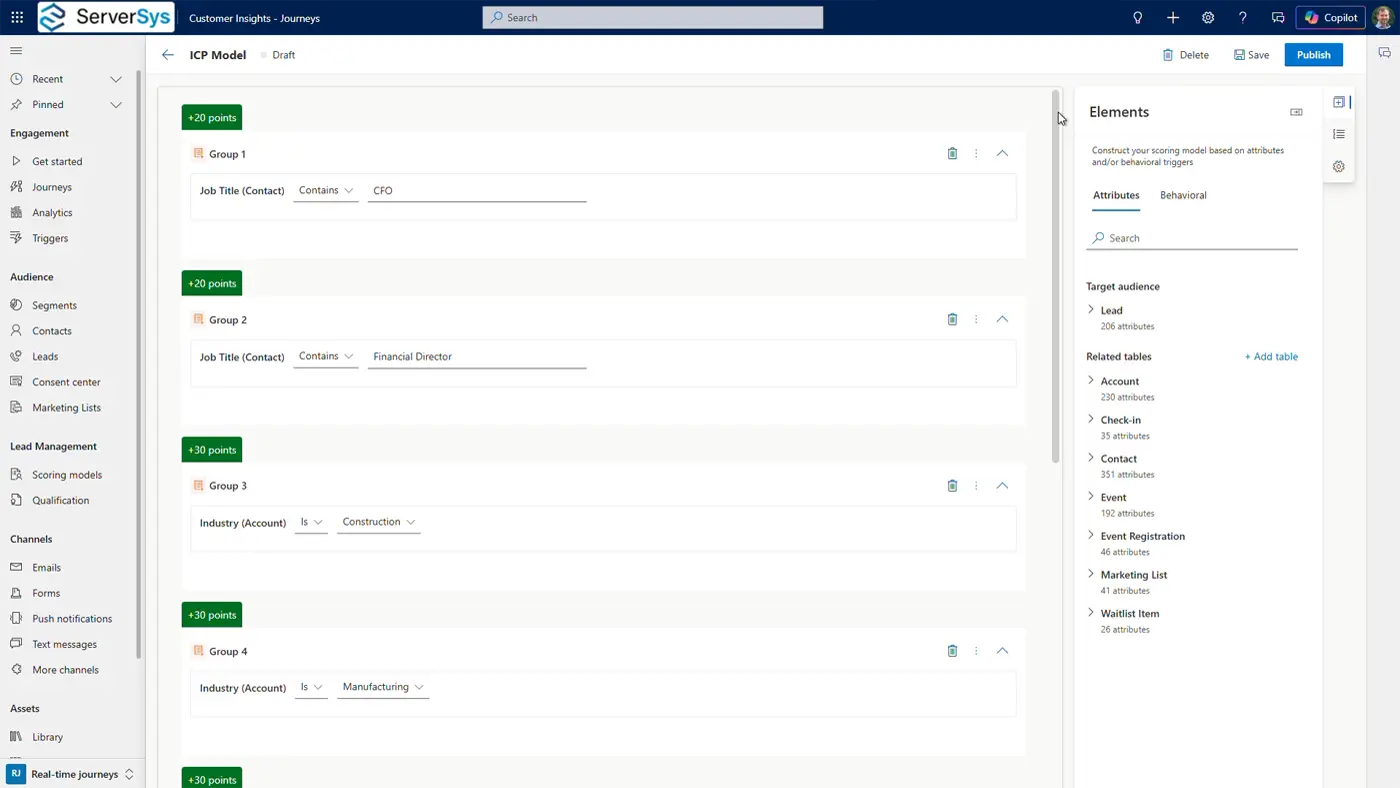
Attribute-based criteria cover demographic and firmographic data such as job title, industry, company size, and location.
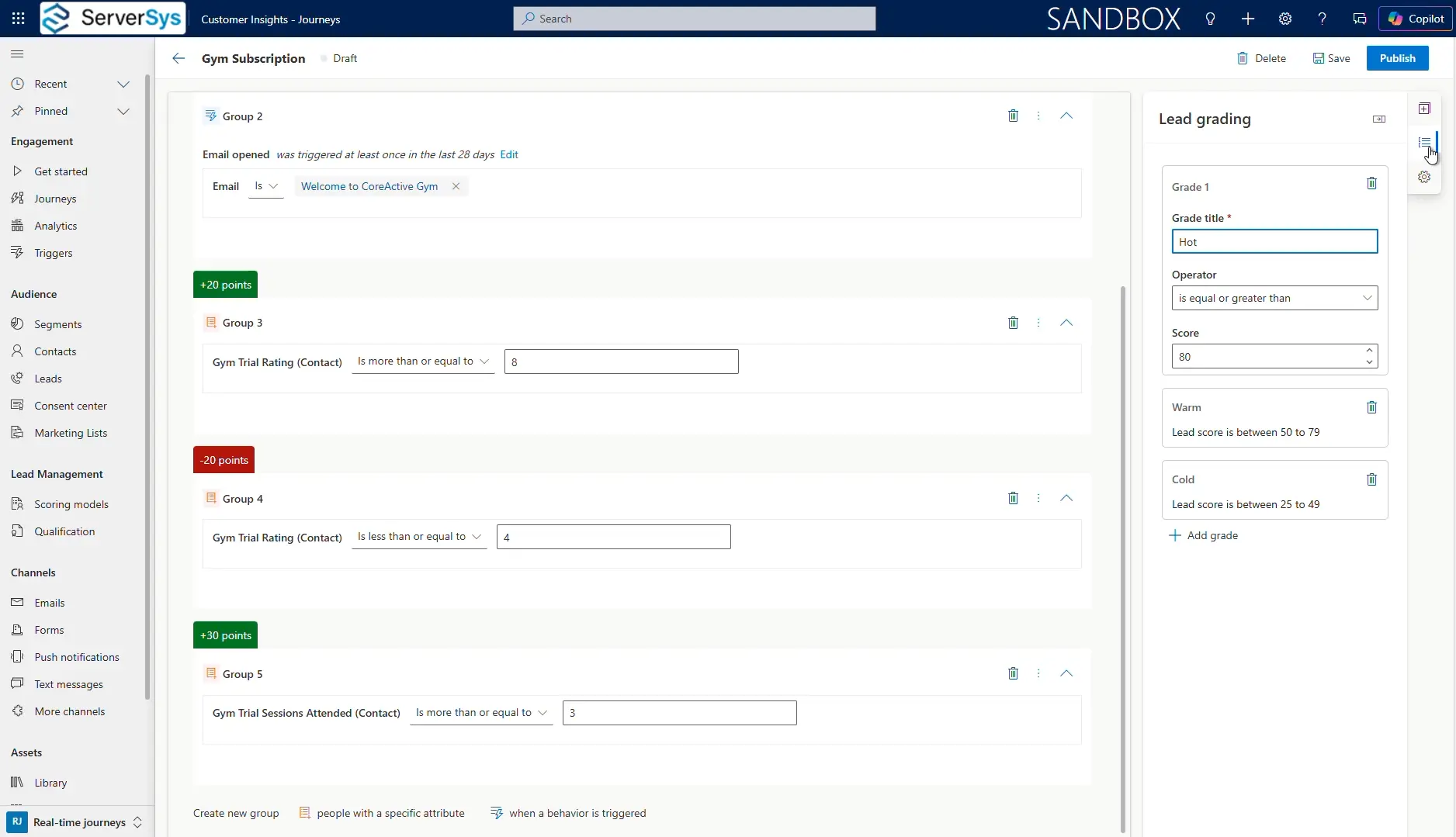
Behavioural criteria track interactions, including email engagement, form submissions, and event attendance.
Each contributes points toward a total score, and grades translate those scores into descriptive labels that everyone can understand, such as Hot, Warm, or Cold.
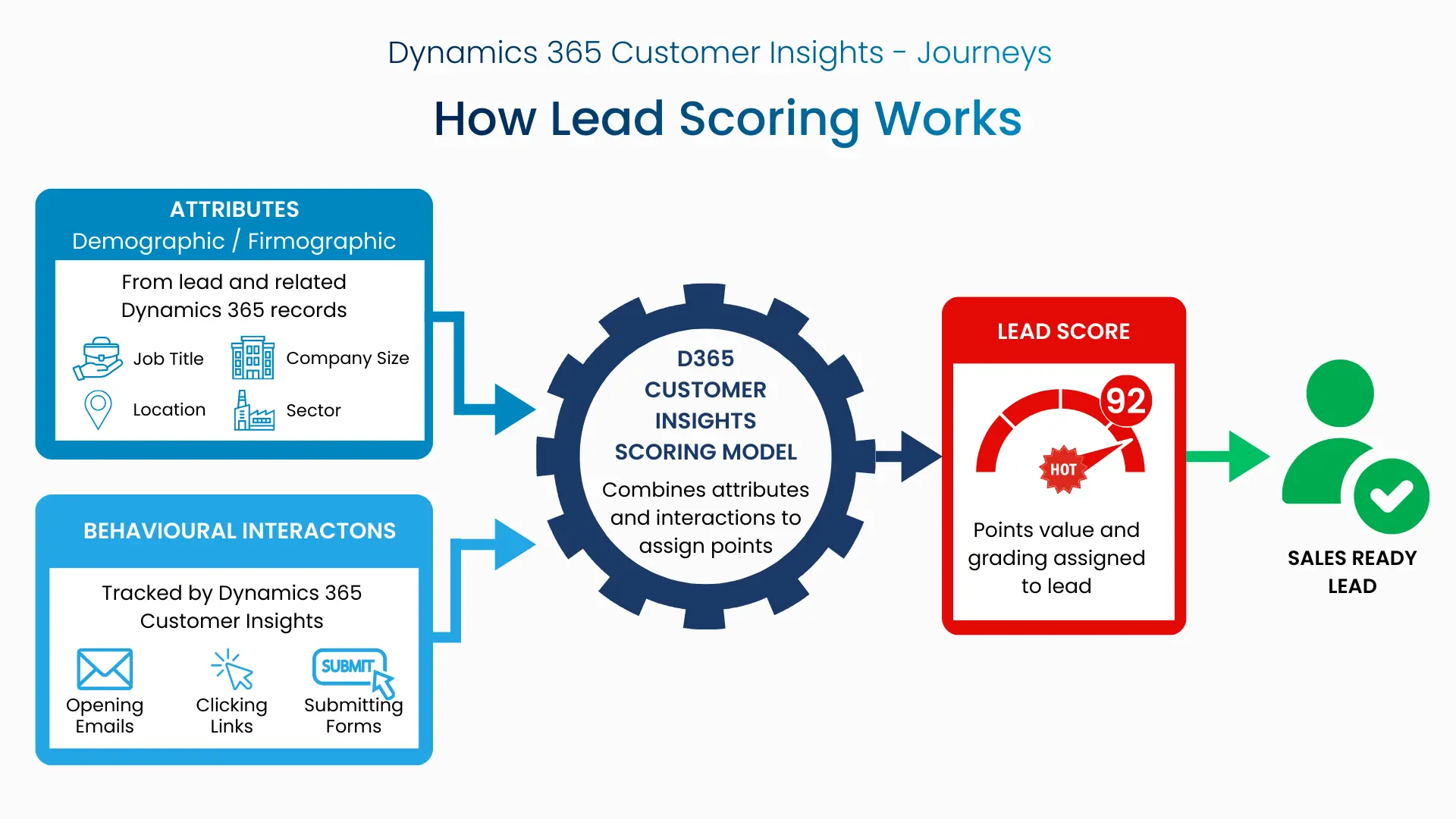
Models refresh automatically, so scores reflect recent activity tracked by Dynamics rather than a static snapshot.
Attribute-based criteria can reference related tables, so a lead score can factor in data from an associated account, such as annual revenue or employee headcount, making each model responsive to the broader context of each prospect rather than just the lead record.
Where scoring connects to sales action
Where this capability goes beyond just scoring, and grading happens after a score is assigned. Customer Insights includes a qualification feature that defines when a lead becomes marketing qualified or sales-ready.
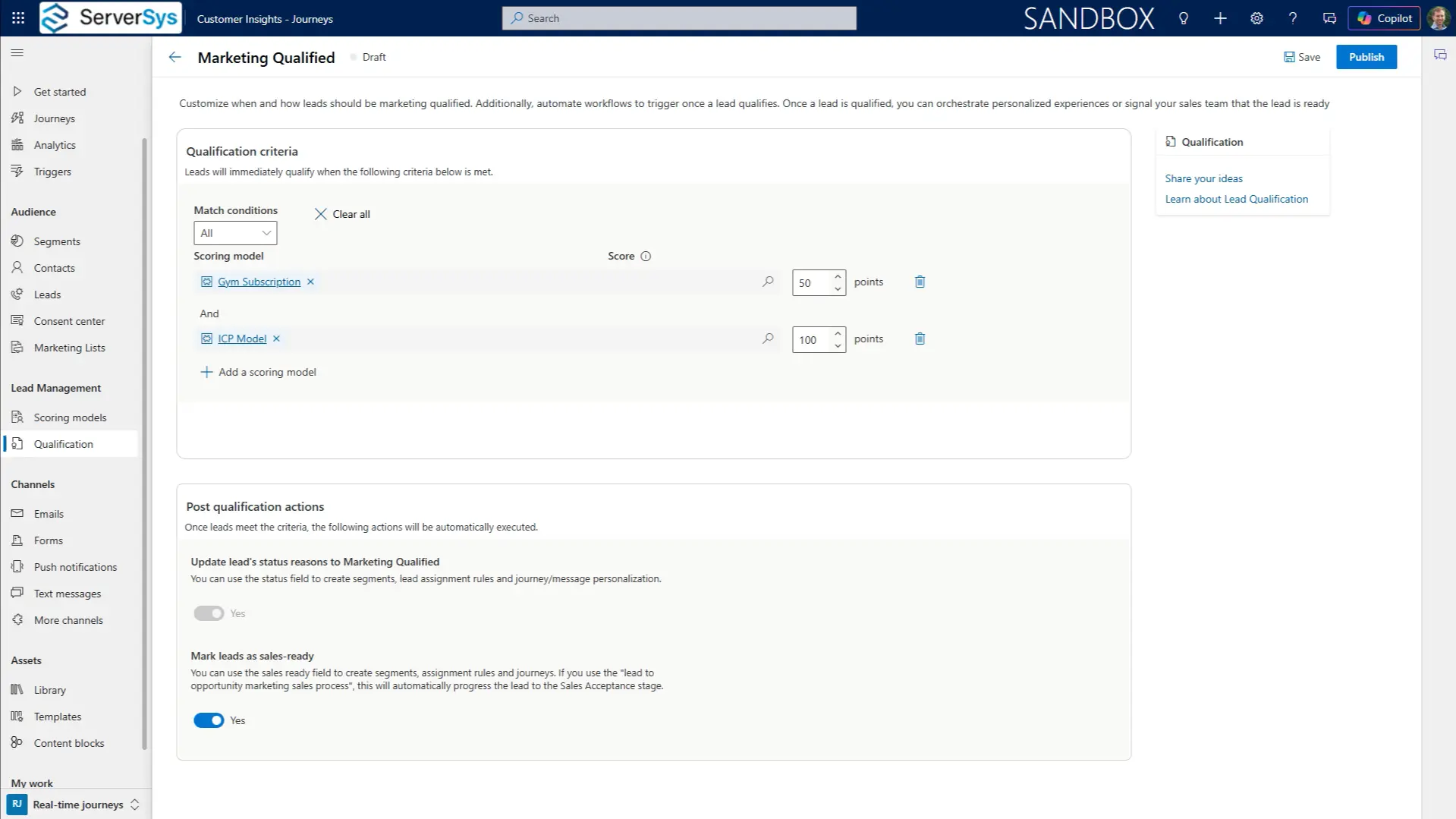
Qualification rules can reference a single model threshold or combine multiple models using AND/OR logic. For example, these could require both a strong ideal customer profile (ICP) fit and a minimum engagement score before a lead is flagged for sales.
From there, automated journeys and Power Automate flows can act on score changes in real time to drive action on the sales side.
A journey might trigger when a lead reaches a “Hot” grade, sending a notification email and scheduling a follow-up activity for the lead owner.
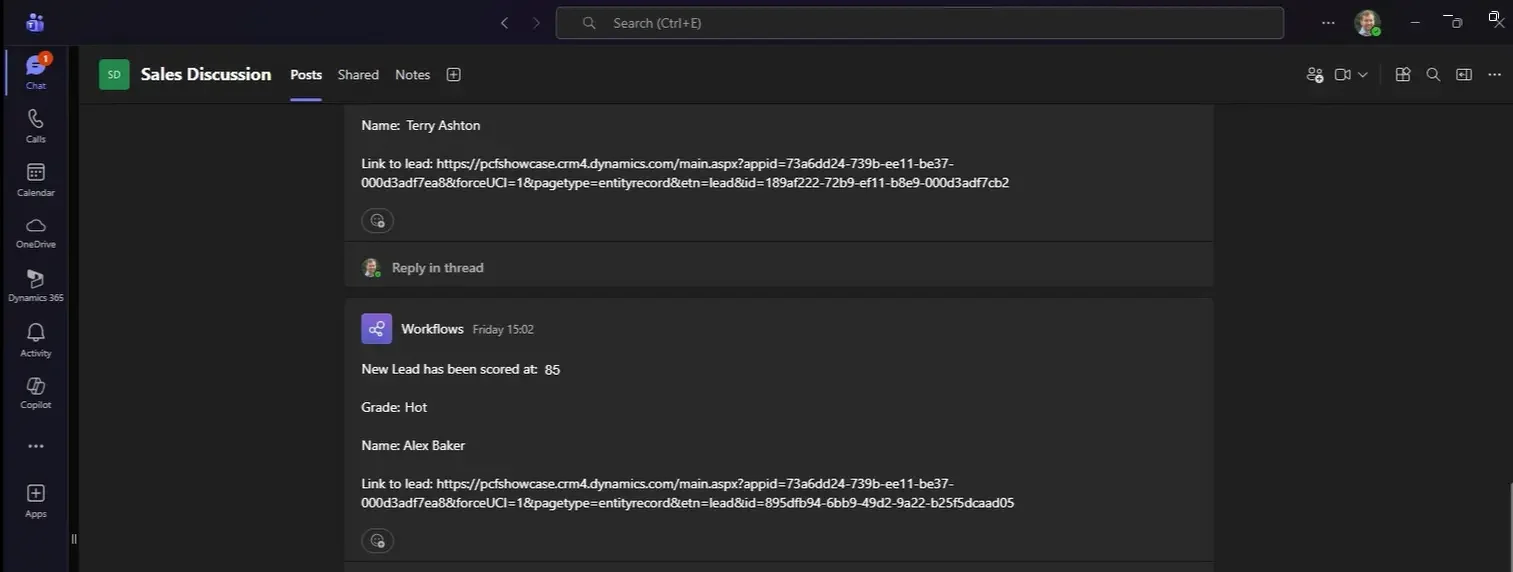
A Power Automate flow can monitor score thresholds and post alerts to a Microsoft Teams sales channel, complete with the lead’s details and a direct link to the Dynamics 365 record.
MQLs and what scoring can realistically achieve
It’s worth acknowledging that marketing qualified leads (MQLs) have well-documented limitations as a standalone metric.
Forrester’s research highlights that B2B buying decisions are rarely made by individuals – their Buyers’ Journey Survey (2023) found that 93% of B2B buyers participated in a buying group of two or more people.
A single lead crossing a scoring threshold is unlikely to reflect genuine buying activity from an account.
However, lead scoring remains a practical tool in many organisations, so MQLs don’t have to be abandoned, but they do need rigour behind them.
Gartner’s research reinforces why this matters: 84% of business leaders acknowledge the marketing-to-sales handoff as one of the most significant challenges they face, and 66% say establishing a lead-qualifying and scoring method is one of the most effective measures for improving alignment.
When scoring models align to a shared ICP and are grounded in meaningful behaviours rather than surface-level engagement metrics, MQLs become a more reliable signal for sales teams to act on.
What we recommend before you start
If you’re considering implementing lead scoring using D365 Customer Insights, there are several points worth addressing early.
Start with your data
Scoring rules that reference free-text fields, such as job titles, are only as reliable as your underlying data. If your cells contain inconsistent titles, such as “Financial Director,” “Director of Finance,” and “FD”, a rule matching on one of these values will silently miss the others.
Similarly, if your scoring model references related tables – such as pulling employee count or industry from an associated account record – these parent relationships must exist. While leads without a linked account won’t generate an error, they won’t score, which skews results without any visible warning.
Agree on your model rules with sales before implementation
A scoring model designed in isolation by marketing is unlikely to earn the trust of the team expected to act on it. Involving sellers in defining what a high-value lead looks like builds shared ownership of the criteria for scoring and grading.
A high score might indicate a strong ICP fit based on profile attributes, but not necessarily active buying intent. Transparency about what the numbers mean, and what they don’t, prevents misaligned expectations.
Plan your rule logic carefully
Multiple conditions within a scoring group always use the AND operator. This means all conditions must be true simultaneously to award points.
That works well for combining complementary criteria, but creates problems when the intent is to match any one of several values. For example, grouping “Job Title is CEO” and “Job Title is Chief Executive Officer” within the same group will never score, because a record cannot hold both values at once. The model designer will publish this without warning, as there is no built-in logic validation.
Careful planning of your group structures will avoid hidden scoring failures that are difficult to diagnose later.
Consider graduated decay for interaction scoring
Rather than awarding a fixed number of points for an interaction within a single time window, consider using time-based conditions that create a graduated drop-off.
For example, awarding 10 points for an email click in the last 7 days and 5 points for a click in the last 30 days creates a smoother transition that better reflects fading engagement rather than a cliff-edge where all points disappear on day 8. This needs to be thought through for each model, but it helps scores track more closely to people’s behaviour.
Start simple and refine
Build a model with a small number of rules that make clear sense to your business. Test that it supports your sales team before adding complexity. Review your rules over time. Customer demand and behaviour patterns shift, and your model should evolve with them.
The goal should always be to relevance rather than volume. Effective score distribution typically means relative few leads receiving these highest values and grades.
If you are using the sales-ready toggle on qualification models, make sure the downstream processes are ready to handle it. The automation after qualification matters as much as the scoring itself.
Why Lead Scoring isn’t enabled by default
Lead scoring is not automatically enabled in D365 Customer Insights.
Because it involves automated profiling of individuals based on their personal data and behaviour, scoring intersects with data privacy regulations, including GDPR. Before implementing, ensure this capability complies with your data processing policies and relevant regulations. For certain types of organisations, this may be a reason not to use lead scoring.
We covered this, along with other optional features, in our article about 12 Dynamics 365 marketing features to consider enabling.
Lead Scoring Demonstration
We’ve produced a detailed Customer Insights demonstration covering three lead scoring scenarios, qualification rules, and how journeys and Power Automate connect scores to sales actions.
Watch the full walkthrough on YouTube.
How ServerSys can help
Whether you’re considering Customer Insights or looking to realise more value from an existing implementation, we can help you configure scoring models that reflect how your organisation qualifies leads. Get in touch to discuss your requirements.