

In short: A supplier portal lets suppliers complete their annual compliance declarations online and upload renewed certificates as they expire, with each confirmation tracked in Dynamics 365. Automated reminders replace the email chase, and documents can be checked in-year, so any lapses are quickly identified.
Once a year, you ask each supplier to confirm a set of points: that they hold sufficient indemnity and liability cover, that their policies are current, and that they meet their legal obligations, including data protection and health and safety.
These declarations often require supporting documents as evidence. The process usually runs via email: requests go out, replies come back with attachments, and someone reviews them before updating your records.
That task is heavy going on both sides. You are coordinating a supply chain mailing list, tracking who has replied, and following up with the ones who haven’t. Your suppliers are digging out policies, attaching files, and hoping they sent the versions you asked for. When a declaration is late or a document is missing, that involves another round of email.
And this email cycle only gives you a snapshot of compliance at one point in the year, long enough for a material change at a critical supplier to go unnoticed. A supplier portal offers a better way to manage this, keeping compliance up to date without adding administrative burden on your team.
Why supplier declarations work better in a portal
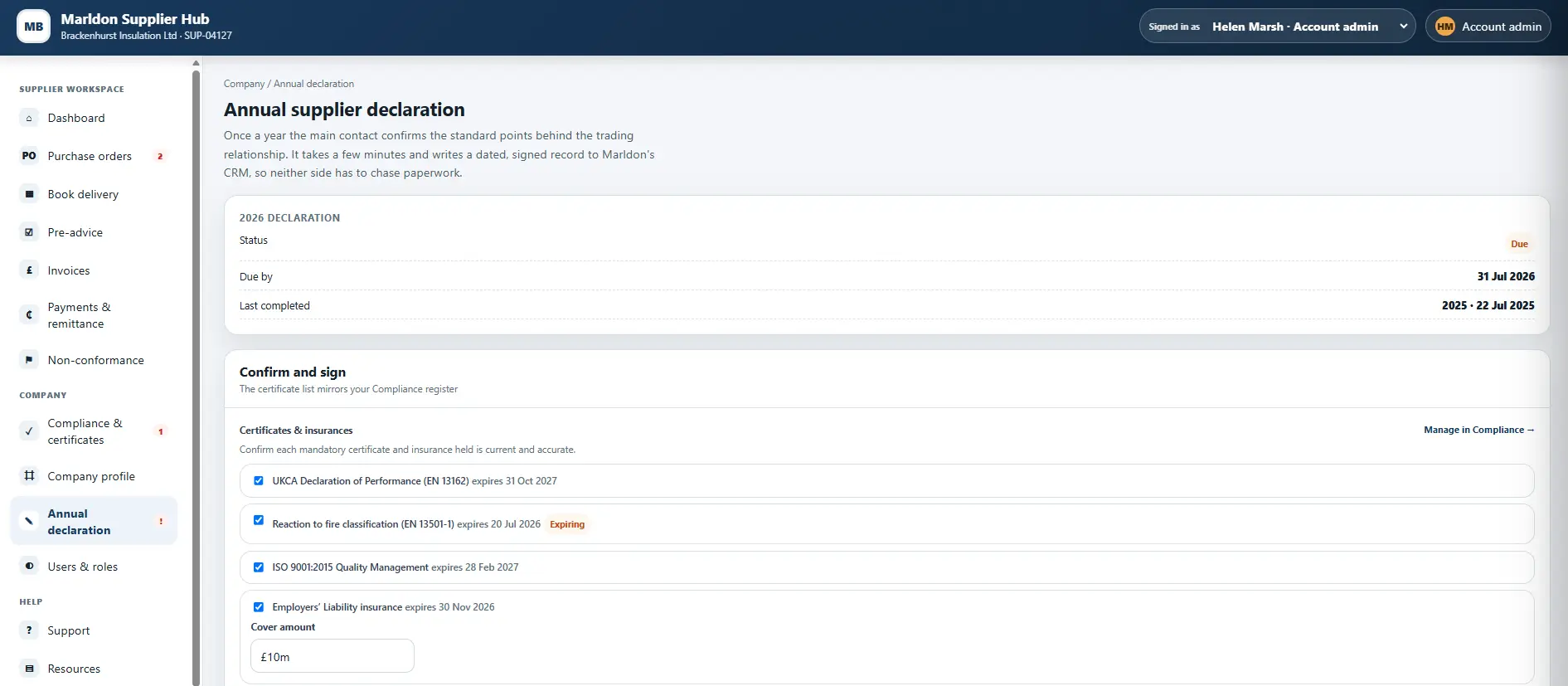
Instead of completing a form and emailing it back, suppliers are prompted to sign in to your portal, work through the same confirmations, and attach any supporting policies and certifications in one place.
What you get back is cleaner than an inbox full of attachments. Each response is complete before it can be submitted, structured the same way, and is applied to the relevant supplier record. The signed declaration writes back to the appropriate record in your CRM and, from there, through to an integrated ERP, so it lands as a dated entry in your system without needing a separate PDF upload.
When an auditor or a customer wants to know your suppliers are compliant, you have dated records, supporting files and an audit trail, which doesn’t involve hunting through emails.
How automated reminders reduce workloads
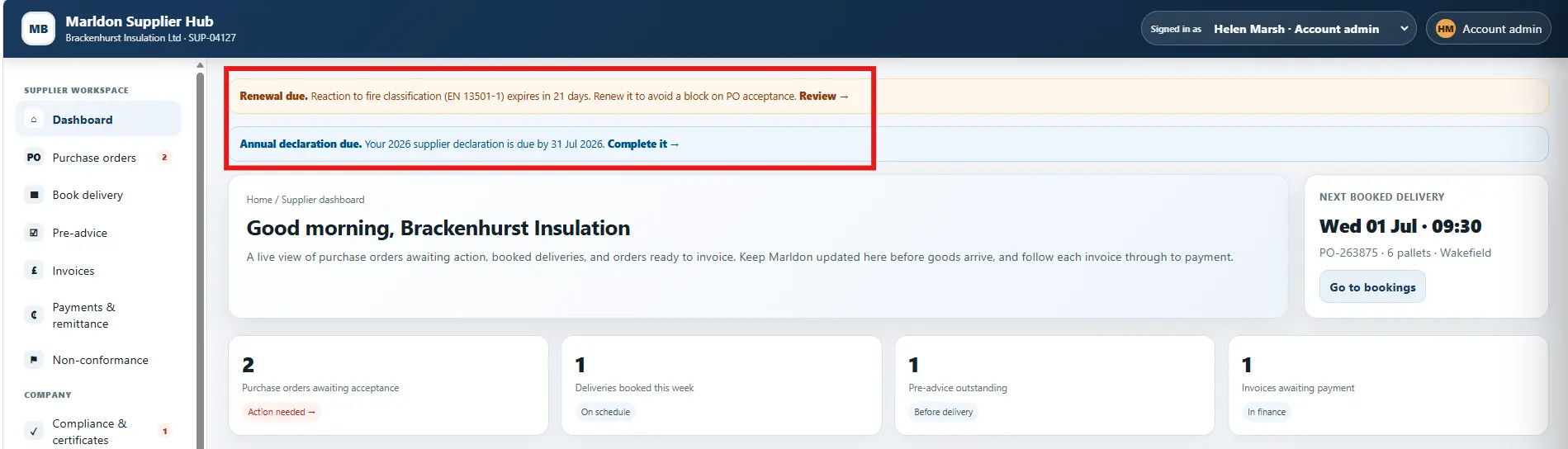
Tracking who has declared and reminding those who haven’t is another time drain. An integrated portal can handle that work too, with reminders shown in the interface alongside automated emails.
Each declaration trigger depends on your supply chain policy. One approach requires these to be completed on each supplier’s anniversary, so the work spreads across the year. Another might set a fixed review date for an entire supply base. Either way, the reminder that used to sit on a to-do list can be handled for you, so the right people at each supplier receive a direct link to the declaration.
Year-round supplier compliance visibility
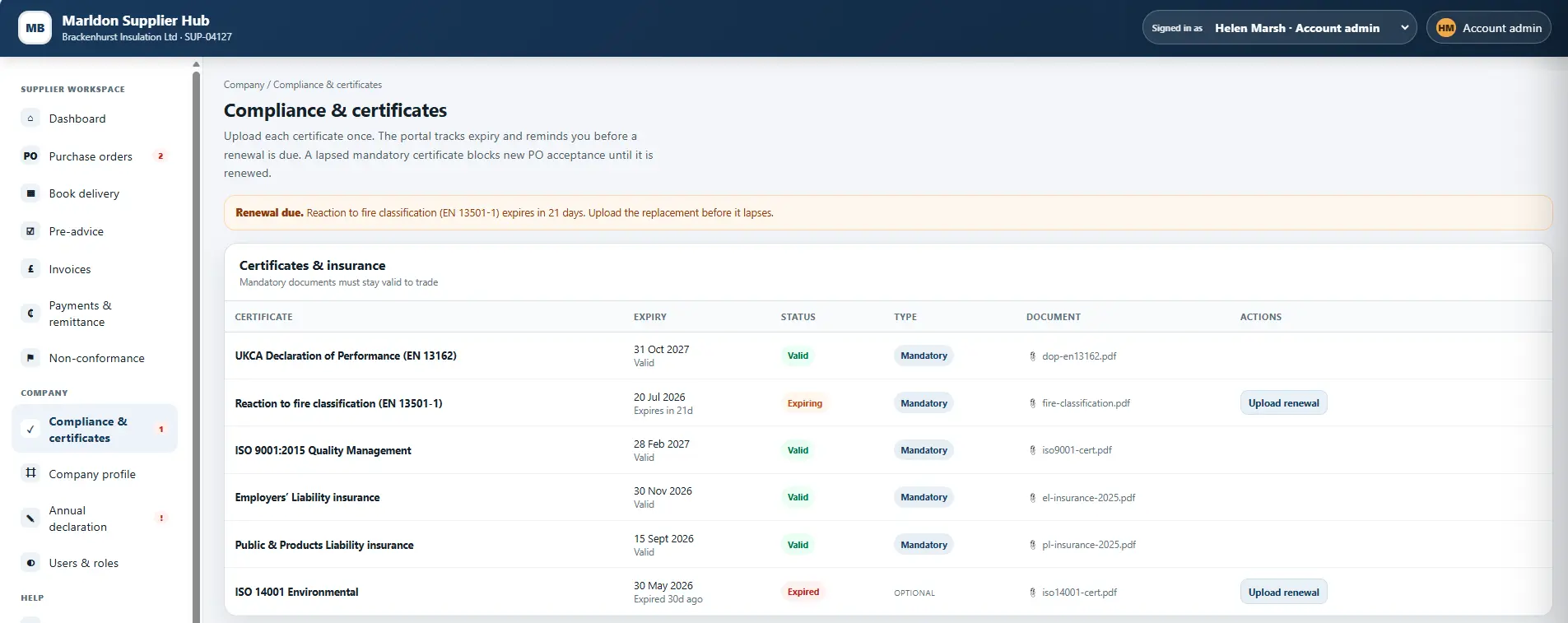
An annual declaration is sufficient for many suppliers. But for your most critical ones, relying on this alone could risk months passing before learning that something material has changed, such as a lapsed policy. If a key supplier’s insurance lapsed in August or its cover reduced, you don’t want to discover that fact the following January.
This is where in-year visibility can help, running alongside the annual declaration. Suppliers can self-serve by uploading renewals through the portal as they occur throughout the year. When a certificate is reissued, the supplier can upload it themselves, and the record stays current between declarations. You decide which suppliers and which documents warrant that closer view.
Automated validation of uploaded documents
When a document is uploaded, the work of reading it doesn’t have to be someone’s task. An AI agent can review each certificate or policy, extract the relevant details directly from the document, and update the related record. No one has to type anything: the supplier uploads a file, and the agent captures the details.
Teams stay in control of what happens next: recent uploads can be routed for a quick check, and anything the agent flags as an exception, such as an invalid document or a reduced level of cover, goes to the right person to review. It’s the same approach we describe in our work on processing documents into Microsoft Dynamics 365, applied to compliance. You can focus on validation and decisions, and no one spends time copying figures from PDFs.
How lapsed declarations and policies can hold up trade
If a supplier is no longer compliant because something has lapsed, you’ll want to act on it. A supplier portal can be configured so that a lapsed critical certificate can block certain online actions until it is renewed. That could mean preventing the supplier from submitting invoices or accepting purchase orders.
With your portal, CRM and ERP connected, these controls can be configured precisely to fit your rules and protect your business. You might want a hard stop only on the most critical cover, or perhaps an alert that prompts an urgent conversation.
What you stop having to chase
Maintaining supplier compliance doesn’t have to mean sending batches of emails once a year and relying on someone to chase. These declarations can be completed in one place, captured cleanly, and recorded in Dynamics 365 against each supplier. Automated reminders can handle the follow-ups.
Where it matters, suppliers keep their renewals current throughout the year via the portal, and trade can be held up automatically if critical cover lapses.
How effective are your supplier compliance checks?
If a critical supplier’s cover lapsed next month, how long would it take you to find out, and how many hours go on managing annual declarations? To see what a supplier portal could do for your company, get in touch to arrange a demonstration.