
Microsoft published the 2026 Release Wave 1 plans for Dynamics 365 and the Power Platform on 18th March, covering updates rolling out between April and September.
This wave brings improvements across Sales, Customer Service, Customer Insights, and the Power Platform, alongside a growing number of AI-powered agents designed to reduce manual work in CRM.
While many features are initially released in public preview, none are flagged for early access. Features in general availability now arrive via the monthly release cycle by default, so if your production environment follows the monthly cadence, check your update settings before April. UK general availability of Release Wave 1 starts from 3rd April.
The release plans are live documents. Microsoft updates them weekly, adding items, shifting dates, and occasionally pulling features entirely. We recommend treating the release plan publication as a starting point rather than a fixed schedule.
Below is our summary of the features most relevant to Dynamics 365 CRM applications and the Power Platform.
UPDATE: What Happened to the 2026 Release Wave 2?
Model-Driven Apps
The Modern Look Becomes Permanent
If you’ve not already enabled the refreshed interface in your Dynamics 365 or model-driven apps, expect it to arrive in April. This update removes the toggle that let users revert to the classic look, making the modern interface the default for everyone.
Alongside this, a simplified app header layout, a decluttered sitemap, and condensed page headers are reaching general availability after being in preview since last year.
Better Search in Grid Filters and Lookups
Finding records in Dynamics 365 should feel noticeably faster. A series of search improvements to grid column filters and lookup fields on forms will use Dataverse search to deliver contains-based and fuzzy matching, highlight where search terms appear in results, and apply consistent behaviour across filters, lookups, and global search.
AI-Powered Row Summaries
Row summaries provide AI-generated context on forms and grids. This wave adds the ability to assign security roles to individual summaries for finely tuned access and makes these insights visible on view pages without needing to open each record. If you manage sensitive data across different teams, the security role assignment is a welcome addition.
Platform Governance
Restore Deleted Records and Flows
In preview since 2024, the deleted records recovery feature in Dataverse becomes generally available, allowing admins to recover accidentally deleted or bulk-deleted table records within a configurable retention period of up to 30 days.
Previously, recovering deleted records has ranged from difficult to impossible depending on the circumstances. Admins must first enable this feature at the organisation level.
A similar capability for Power Automate flows means flow owners and environment admins can recover accidentally deleted flows within a set timeframe.
Usage Insights in the Admin Centre
A new summary view in the Power Platform Admin Centre highlights adoption trends over time and your most-used resources, including top apps by user activity, top flows by run volume, and top agents by session count.
Power Pages
Dynamics 365 Portal Templates Get a Modern Foundation
The legacy Dynamics 365 portal templates, many of which trace back to the ADX Studio era, are being upgraded to Bootstrap 5 and the enhanced data model. These templates now become solution-aware and transportable across environments. If you run a customer self-service portal, this is a welcome modernisation.
Unified Authorisation and Enhanced Authentication
Power Pages currently maintains its own web roles alongside Dataverse security roles. This release merges them into a single authorisation model, removing duplication and confusion when configuring access for portal users.
Separately, enhanced OpenID Connect support with encrypted tokens will open Power Pages up to a broader range of identity providers, and new environment-level governance controls give admins more nuanced management of external authentication.
Analytics, Monitoring, and Security
New telemetry and analytics for Power Pages sites provide insights into page views, form interactions, and client-side activity, as well as server-side error detection and access logs for troubleshooting.
The Monitor area in the Admin Centre adds session counts, page load times, and error rates. A new security agent also monitors and flags threats such as content violations, phishing, and denial-of-service attacks.
Server-Side Logic and Client APIs
Two developer-focused features reach general availability. Server-side logic lets you write JavaScript that runs on the server rather than in the browser, directly within a Power Pages site. Client APIs provide programmatic control over Power Pages components via JavaScript, reducing complexity in site development.
Dynamics 365 Customer Insights
Create Any Record Directly from a Journey
Journey actions have been mainly limited to communications, tasks, and phone calls. Anything more specific typically requires a Power Automate workaround.
This release adds a Create Record tile directly in the journey designer, letting you create any Dataverse record (leads, opportunities, cases and custom entities) with full control over fields and dynamic values. For example, journeys can now create leads at registration, confirmation, or event check-in without custom development.
Branded Content Links
This long-promised feature replaces generic Microsoft-hosted URLs with your own branded domain across emails, forms, registration pages, and the preference centre. You can configure one domain per business unit.
For organisations where link trust and brand recognition matter, particularly in regulated sectors, this has been a significant blocker. First announced in 2024 and pulled several times, this feature is now expected to reach general availability by December 2026.
Message Expiry Dates
You can now set an expiry date and time on any email, text message, or notification in your journeys. If the message hasn’t been sent by the specified time, it won’t go out. This is particularly useful for event reminders, where it eliminates the complex branching logic previously needed to prevent late sends.
Dynamic Content Blocks
Content blocks can now be set as static or dynamic. Dynamic blocks are protected by default and automatically update across all emails whenever the source block is changed. This means a single edit to a footer, logo, or disclaimer pushes everywhere it is used, without manually editing each email template.
A New Connector for Customer Insights Data
Customer Insights is getting a new connector that lets AI agents in Copilot Studio tap directly into unified customer data.
Agents can pull email engagement, website activity, churn scores, customer lifetime value, segment membership, and external data sources not held in Dataverse, all through a single connection. It also identifies the authoritative record when duplicates exist. This means sales, marketing, and service teams can ask an agent about a contact and get a complete picture without switching tools.
Dynamics 365 Sales
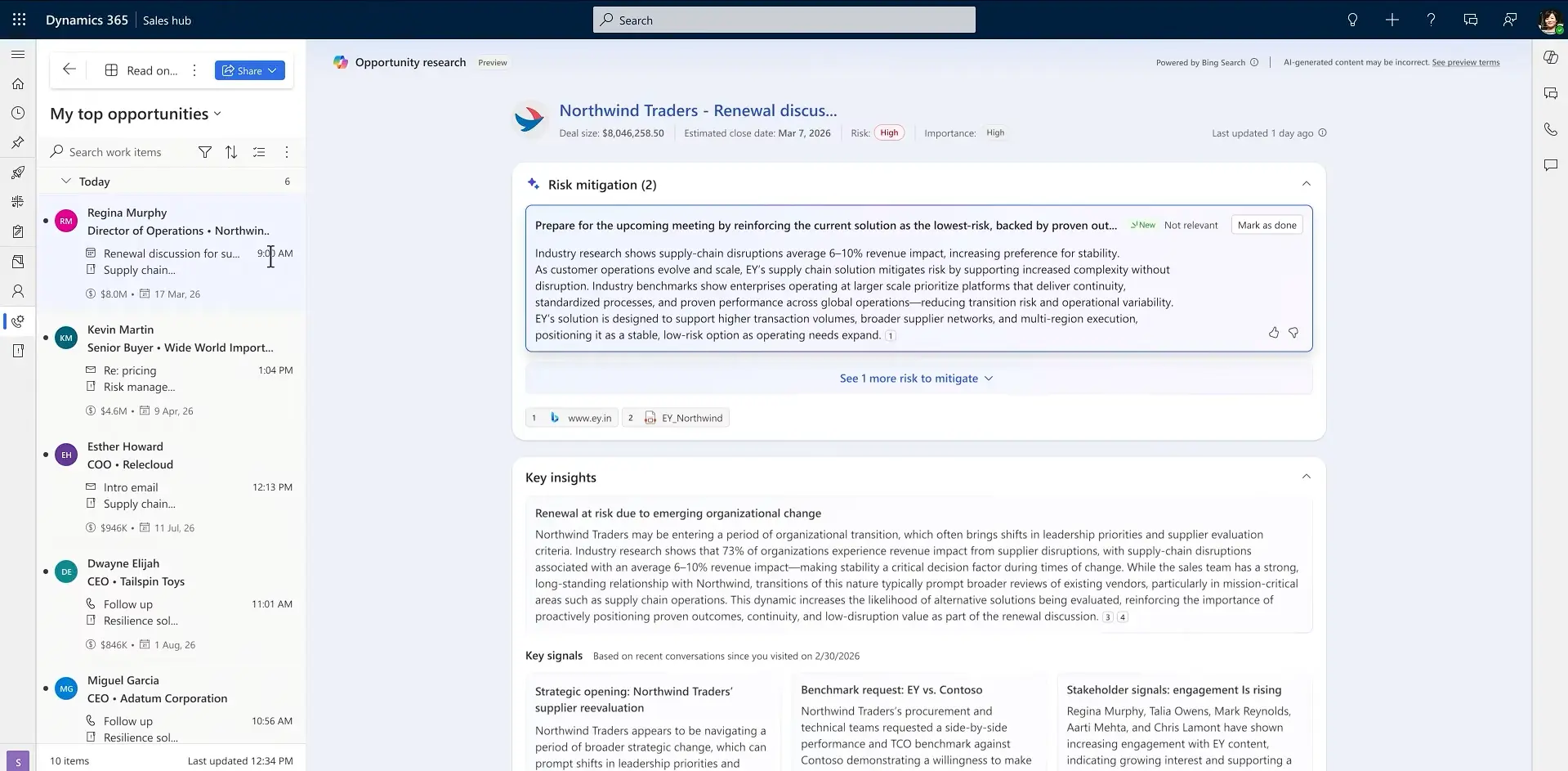
Opportunity Summaries from the Sales Agent
The Sales Agent in Copilot for Dynamics 365 auto-generates structured opportunity summaries by combining CRM data with email, meeting, and collaboration signals. It surfaces next steps, risks, and blockers in a review-ready format. Sellers can refine the output through natural-language follow-ups, and admins can configure summary prompts to align with organisational sales processes.
Quick Campaign Overhaul
Quick Campaigns have seen virtually no meaningful improvement in years. This long-overdue release overhauls the bulk email experience. The multi-step wizard becomes a single flow. Templates can be created and edited inline. You can personalise sends without overwriting shared templates, compose one-off emails from scratch, and preview or test-send before committing.
Sales Close Agent
The Sales Close Agent researches open deals, finds insights, flags risks, and recommends next actions so sellers can progress opportunities without leaving CRM.
This wave brings signal-based refresh (automatic updates when deal conditions change), stage-aware guidance tailored to the current process step, historical pattern recognition that links past deal outcomes to recommended actions, and a conversational chat interface for asking deal-specific questions. Sellers can rate or flag insights, and the agent adapts over time.
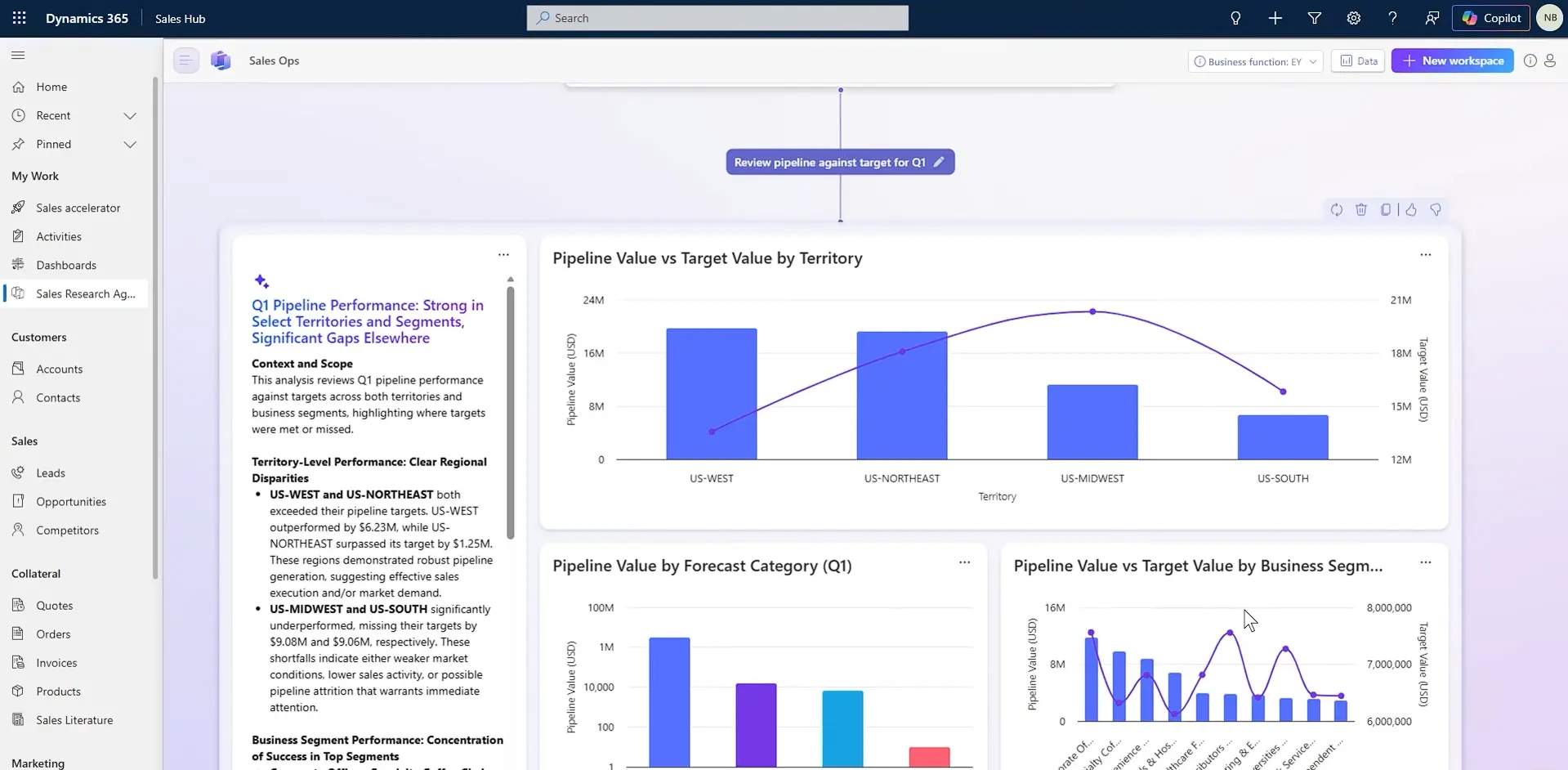
Sales Research Agent
A new AI tool that lets sales leaders ask complex business questions in natural language and get real-time answers from CRM data, Fabric Lakehouse data, and uploaded files.
Features include interactive visualisations, AI-suggested research topics, saveable workspaces, and portfolio planning for account and territory decisions that update dynamically as conditions change.
Sales Qualification Agent Improvements
The Sales Qualification Agent, which works through high volumes of inbound leads, gains multi-agent capabilities. You can deploy agents aligned to specific products, regions, and teams, each with its own qualification rules, knowledge resources, and engagement approach. The agent can also assess lead fit using external online sources, such as company websites and custom data, in addition to your internal criteria.
AI-Powered Opportunity Data Enrichment
Two features tackle the persistent problem of incomplete or outdated opportunity records.
The first analyses email conversations to identify gaps and suggest updates, with context explaining each recommendation. The second extends enrichment to third-party data connectors and Microsoft Teams meeting intelligence for broader coverage.
Admins control which opportunities are selected and whether updates apply automatically or need manual review.
Other Dynamics 365 Sales Updates
A new in-flow email template picker for Sales Sequences simplifies creating and modifying templates without leaving the sequence designer.
The Sales Hub gains integrated calling, including inbound call handling, customer matching, automated call logging, modern controls, conversation intelligence, and call recording.
Next-best-action cards and lead research insights are being promoted throughout the flow of work, including entity grids, Microsoft 365, and Outlook.
Dynamics 365 Customer Service
Case-Level Sentiment Indicators
Sentiment analysis, previously visible only on individual emails, chats, and calls, now appears at the case level across both forms and views. Service reps and supervisors get an immediate read on how a case is trending without having to trawl through individual conversations.
Case Management Agent Testing
Admins can run full end-to-end resolution simulations from the admin centre before deploying agents to production. Review draft customer emails, intent handling, tools used, and agent responses to identify gaps before go-live.
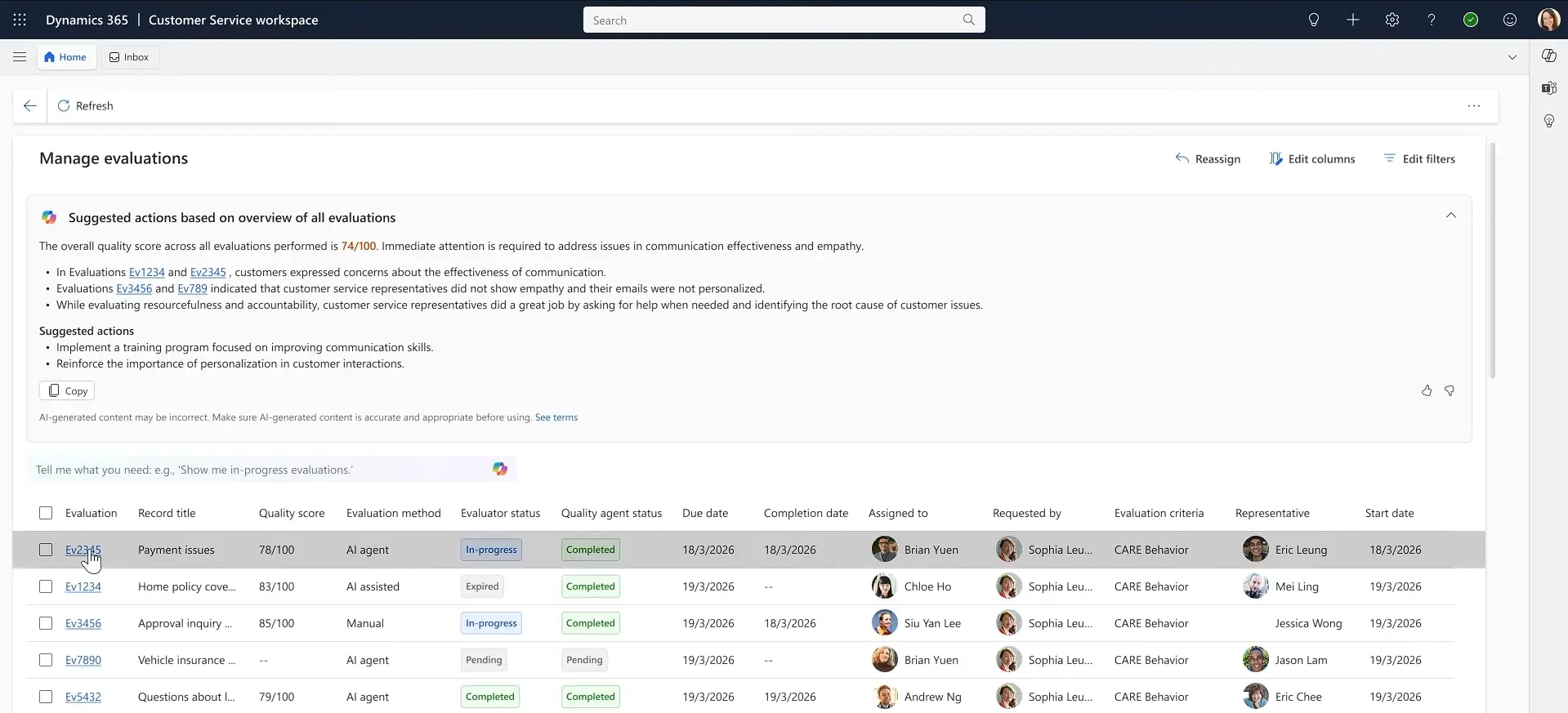
Quality Evaluation Agent Updates
Questions within evaluation criteria can now be marked as critical. If a specific response is given, the entire evaluation fails regardless of other scores. This ensures non-negotiable standards, such as required disclosures, are always enforced.
Screen Recording and Workforce Forecasting
Service reps can now have their on-screen activity recorded during interactions, with up to two hours per session stored in Dataverse. Security roles control who can view and download recordings. Separately, the workforce management add-on gains AI-based demand forecasting derived from historical data, along with the reasoning behind each prediction.
How to Stay on Top of the Release Wave 1 Changes
The features outlined here reflect what Microsoft has published so far. The Release Wave 1 will continue to change between now and September, with items being added, postponed, or modified as the wave progresses.
The most reliable way to check release timings and keep up to date is through live resources rather than a static document. The official Microsoft Release Planner is a comprehensive database of all features, allowing you to filter by product, availability, and change history. Microsoft updates it continuously as timelines shift and new announcements land.
The release plans are also available on Microsoft Learn for Dynamics 365 and Power Platform.
If any of the features covered here affect how your team uses Dynamics 365, or if you want to understand what a specific change means for your setup, get in touch, and we can talk it through.