
If someone in your organisation opens PDFs, reads their contents, and enters the details into Dynamics 365, there’s a good chance they don’t need to.
AI agents can now do the reading, the data entry, and (where your rules allow) the routine decisions that follow.
Whether documents follow a standard template or arrive in unpredictable formats, AI can extract the data, apply organisational logic, and escalate exceptions to the right person.
The key is governance: how the agent is designed determines what it handles independently and what gets referred.
The results are measurable. You can compare before and after within weeks: time saved, errors reduced, volume handled.
If your business is growing but you don’t want to increase headcount or lose control, this is how you close the gap.
The Document Problem That Hasn’t Gone Away
The Department for Science, Innovation and Technology (DSIT) surveyed 3,500 UK businesses in 2026. The most common barrier to AI adoption? Not knowing where to use it was cited by 71% of firms.
Document management is a good place to start because problems are visible, waste is measurable, and outcomes are concrete.
Automation has reshaped how businesses operate, yet document handling remains stubbornly manual in many organisations because earlier approaches had limitations.
Template-based extraction tools work well when documents follow a consistent format, but they struggle with variation. Suppliers send invoices which have different layouts, prospects format RFPs in their own ways, and insurers receive claims with a variety of supporting paperwork.
The newer generation of AI go beyond optical character recognition. Rather than relying on fixed templates and field positions, language-based models read documents, understand context and determine their meaning. They recognise that “estimated project budget: £150k” and “we anticipate a spend of around £150,000” say the same thing. Real-world documents are inconsistent, so business processes need to handle that without falling back to manual work.
Template-based extraction remains ideal for identically formatted documents, but AI-based interpretation fills the gap when layouts vary. The point is that no one in your organisation should need to be the fallback when technology can’t cope.
Replacing Hours of Manual Order Entry
On a recent project, we worked with a client whose team was spending dozens of hours each week processing up to 500 inbound email orders.
These arrived as PDF and image attachments to a dedicated mailbox, and someone would open each attachment, read the order details, and manually enter them into Dynamics 365.
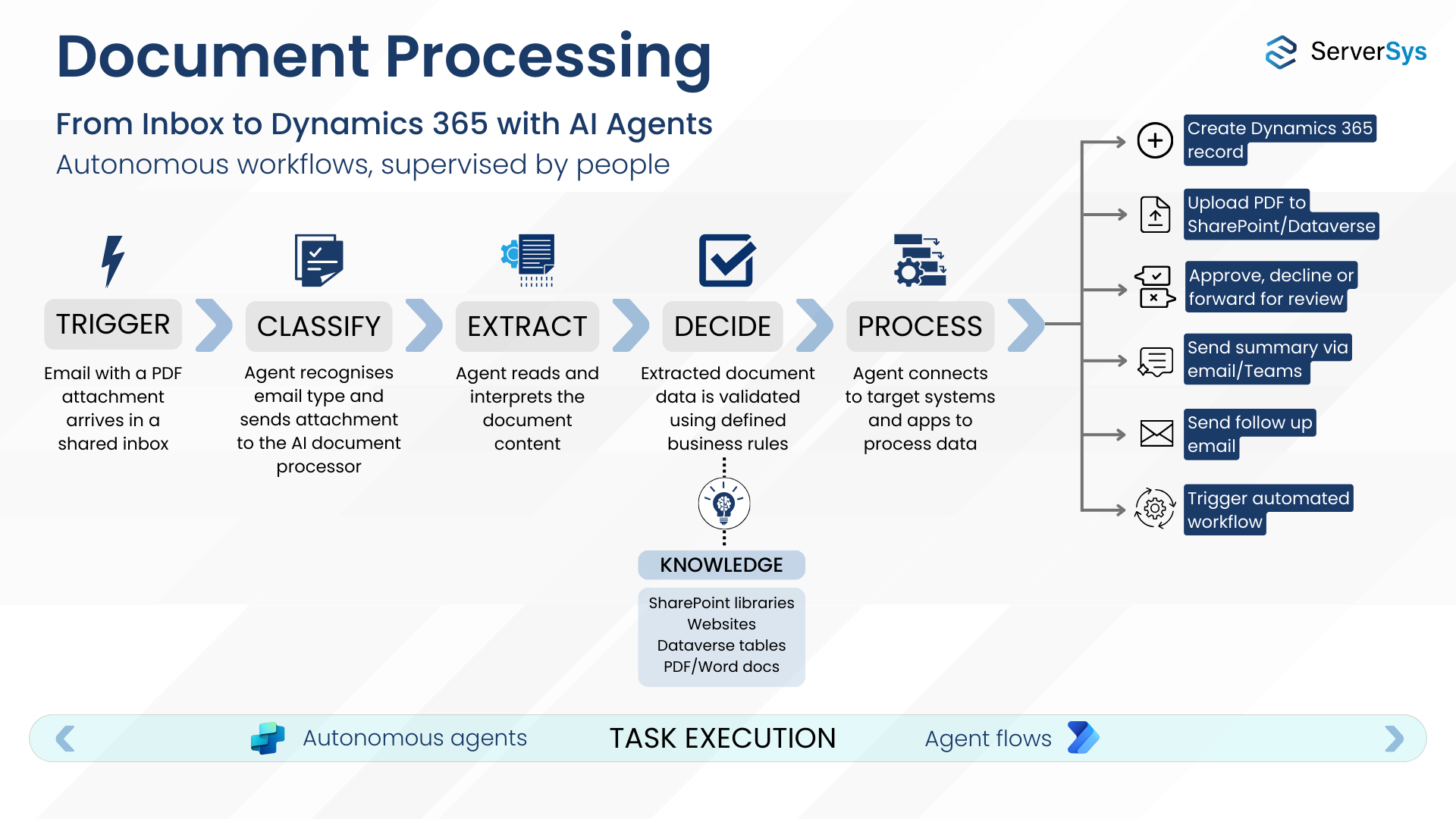
We built an AI process using Power Automate to handle this workflow. The agent monitors the inbox, extracts order data from attachments to create records in Dynamics for human validation.
In this example, the process has been trained to identify details, product names, item numbers, quantities, currencies, addresses and prices, and work across multiple languages.
For high volumes, individuals can manage recently processed documents using a specific view in CRM. Alternatively, the right people could receive an email notification or a prompt in Microsoft Teams with a link to the Dynamics record, which requires validation.
Time is saved, manual data entry is gone, but human oversight remains. Because the process is tracked end-to-end, the business has complete visibility of every order and approval.
Try our calculator to see the potential savings you can make by automating manual data entry from documents.
What About Documents That Don’t Follow a Standard Format?
Emailed orders to a dedicated mailbox are relatively contained. But many document challenges are messier, such as received orders, which are formatted in different layouts.
Inbound requests for proposals (RFPs) are another example.
Proposal requests can arrive in multiple mailboxes, mixed in with general enquiries, support questions, and everything else.
The first challenge is identifying them. An AI agent can monitor shared mailboxes, classify incoming emails, and distinguish an RFP from a routine enquiry before extracting anything.
You might already use AI to interpret RFP documents and draft responses. But how effectively are you capturing this detail in CRM?
In most cases, only basic information is logged: the requirement type, potential deal value, and a target date. The opportunity form collects only the minimum details because entering more takes too long.
This is where AI document workflows add value beyond time saving. If your opportunity form in Dynamics 365 includes fields for budget, requested products/services, due date, contract duration, and specifications, an agent can read any RFP, regardless of format, and map its findings to those fields.
The salesperson still reads the full document and applies their commercial judgement. The difference is that the key details are captured in the CRM without anyone having to type them.
You may need to extend your opportunity form first, but the payoff goes beyond saving time on a single RFP. At scale, you build a structured picture of what your market is asking for. You can compare win rates against requirement types and spot where your pipeline is strongest.
When an NDA Holds Up Deals
Anyone in B2B sales will recognise this one. During a sales process, a prospect sends an NDA. You aren’t authorised to sign it, so you forward it, but what follows is a messy email chain or back-and-forth in Teams.
Nobody knows the status, the prospect chases, and the deal stalls over paperwork.
An AI agent can extract key terms such as parties, obligations, duration, jurisdiction, and any non-standard terms.
It can go further than extraction. If the agent is grounded in your organisation’s NDA policies, it can assess whether the proposed terms fall within those boundaries. Standard terms that align with your policies can be approved without involving legal at all, empowering the salesperson to sign and keep the deal moving.
Non-standard or exceptional clauses are escalated for review. The salesperson is kept informed, approved NDAs are accessible in Dynamics 365, and deals can move forward.
The result is a faster process, consistent decisions based on your own rules rather than individual interpretation, and a clear record of every signed NDA.
Claims That Need Judgement, Not Just Typing
Whether processing insurance claims or product warranty requests, the pattern is similar. A claimant submits documents, including receipts, photos, incident reports, and proof of purchase. Someone opens each one, verifies the details, enters the data, and decides what happens next.
AI agents can classify these documents by type, extract claimant or product details, cross-reference against policy or warranty records in Dynamics 365, and flag inconsistencies. The agent routes the case to a handler for review and decision.
In highly regulated industries, human review is not optional, so AI doesn’t replace the decision-maker but eliminates the hours of preparation.
For organisations handling claims at volume, the before-and-after comparison is striking. Handling times drop, error rates fall, and teams focus on cases that require judgement rather than typing.
Human Oversight Is a Design Decision
In each of these examples, human control and review are central.
Sometimes the agent makes the decision, grounded in organisational rules and policies. In others, it prepares the data for human validation.
The critical requirement is guardrails, but these need something to work from.
An AI agent can only apply your business logic if it is defined. The rules that govern how your team processes documents and handles exceptions must exist outside people’s heads. That might be a single reference document or several, depending on the complexity of your process. Without this, the agent has no context for decisions or escalations and no basis for consistent behaviour.
Undocumented processes are where AI agent projects often stall. If you want measurable AI gains, the starting point is always your data and workflow rules before the technology.
Well-designed governance ensures that routine decisions are handled consistently by the agent, while exceptions are escalated to the appropriate person. The DSIT study found that 67% of UK businesses using AI apply significant human oversight to outputs. Designing those guardrails is where consultancy earns its place.
Where to Start
You almost certainly have at least one process where someone manually enters data from documents into a business system. Orders, quotes, contracts and claims are just a few examples. These might be PDFs or scanned images.
AI workflows follow the same approach regardless of document type. Whether the agent handles extraction, decision-making, or both depends on your unique processes and the governance you put in place around them.
Dynamics 365, Power Automate, AI Builder, and Copilot Studio provide agent building blocks, and your organisation may already have access to these tools.
If you are looking at your own manual data entry and wondering what is possible, see our services for automating the handling of documents in Dynamics 365.